Jak skonfigurować 2FA
Ten przewodnik pokazuje, jak skonfigurować uwierzytelnianie dwuskładnikowe (2FA) na twoim koncie Cryptohopper.
Wymagania wstępne
- Konto Cryptohopper.
- Chęć dodania dodatkowego zabezpieczenia do twojego konta.
Kroki
- Zaloguj się na swoje konto Cryptohopper.
- Kliknij przycisk profilu w prawym górnym rogu.
- Kliknij "Moje konto".
- Kliknij "Profil użytkownika".
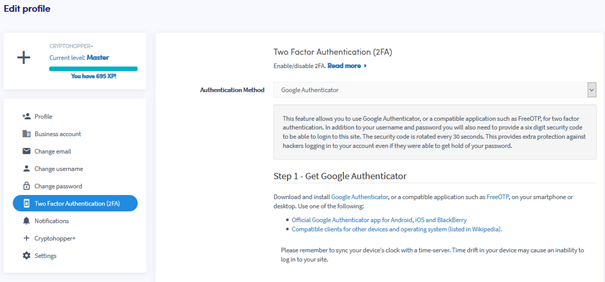
- Kliknij "Uwierzytelnianie dwuskładnikowe (2FA)".
- Wybierz preferowaną metodę uwierzytelniania.
- Postępuj zgodnie z wymaganymi krokami dla wybranej metody.
- Kliknij "Włącz 2FA".
- Zapisz swoje kody bezpieczeństwa i przechowuj je w bezpiecznym miejscu.
wskazówka
Zdecydowanie zalecamy włączenie 2FA na twoim koncie Cryptohopper.