Come configurare la 2FA
Questa guida ti mostra come configurare l'autenticazione a due fattori (2FA) sul tuo account Cryptohopper.
Prerequisiti
- Un account Cryptohopper.
- Il desiderio di aggiungere sicurezza extra al tuo account.
Passaggi
- Accedi al tuo account Cryptohopper.
- Clicca sul pulsante del profilo nell'angolo in alto a destra.
- Clicca su "Il mio account".
- Clicca su "Profilo utente".
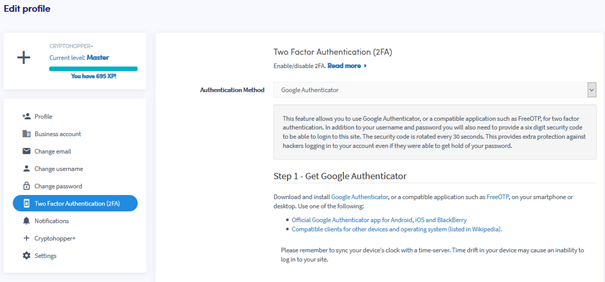
- Clicca su "Autenticazione a due fattori (2FA)".
- Seleziona il tuo metodo di autenticazione preferito.
- Segui i passaggi richiesti per il metodo scelto.
- Clicca su "Abilita 2FA".
- Annota i tuoi codici di sicurezza e conservali in un luogo sicuro.
suggerimento
Ti consigliamo vivamente di abilitare la 2FA sul tuo account Cryptohopper.