Hoe je Triggers maakt met TradingView Alerts
Deze gids laat je zien hoe je TradingView Alerts gebruikt om Cryptohopper Triggers af te vuren.
Vereisten
- Een Cryptohopper account.
- Een Explorer, Adventurer, of Hero abonnement.
- Een betaald TradingView abonnement.
- Begrip van wat Triggers zijn.
Stappen
Stel de Trigger in op Cryptohopper
- Ga naar je basisconfiguratie, klik op "Triggers" en klik op "Nieuw".
- Geef je Trigger een naam en schakel hem in.
- Laat "Selecteer beurs", "Selecteer markt" en "Selecteer kaarsgrootte" ongewijzigd.
- Selecteer "TradingView" als de indicator.
- Selecteer de Actie die je wilt dat de Trigger uitvoert.
- Stel de afkoelperiode in minuten, uren of dagen in.
Verbind met TradingView
- Ga naar Cryptohopper's TradingView app en kopieer de Webhook URL.
- Open TradingView en selecteer de markt die je wilt gebruiken voor de alert.
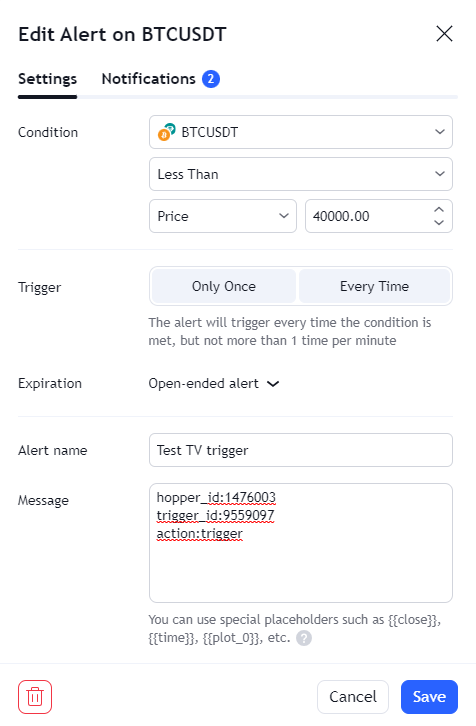
- Klik op de Alert-knop en ga naar het tabblad "Notificaties".
- Plak de Webhook URL in het veld Webhook URL.
- Ga terug naar Cryptohopper's Alert Generator en selecteer "Trigger" als de Actie.
- Selecteer de bot en de Trigger voor deze alert en klik vervolgens op "Genereren".
- Plak het gegenereerde alertbericht in TradingView onder "Instellingen".
- Klik op "Opslaan". Je Trigger is klaar.