Wie man Trigger mit TradingView-Benachrichtigungen erstellt
Diese Anleitung zeigt dir, wie du TradingView-Benachrichtigungen verwendest, um Cryptohopper-Trigger auszulösen.
Voraussetzungen
- Ein Cryptohopper-Konto.
- Ein Explorer-, Adventurer- oder Hero-Abonnement.
- Ein bezahltes TradingView-Abonnement.
- Ein Verständnis davon, was Trigger sind.
Schritte
Richte den Trigger in Cryptohopper ein
- Gehe zu deiner Baseconfig, klicke auf "Trigger" und klicke auf "Neu".
- Gib deinem Trigger einen Namen und aktiviere ihn.
- Lasse "Börse auswählen", "Markt auswählen" und "Candle-Größe auswählen" unverändert.
- Wähle "TradingView" als Indikator.
- Wähle die Aktion aus, die der Trigger ausführen soll.
- Setze die Cooldown-Periode in Minuten, Stunden oder Tagen.
Verbinde mit TradingView
- Gehe zu Cryptohoppers TradingView-App und kopiere die Webhook-URL.
- Öffne TradingView und wähle den Markt aus, den du für die Benachrichtigung verwenden möchtest.
- Klicke auf die Benachrichtigungs-Schaltfläche und gehe zum Tab "Benachrichtigungen".
- Füge die Webhook-URL in das Feld für die Webhook-URL ein.
- Gehe zurück zu Cryptohoppers Alert-Generator und wähle "Trigger" als Aktion.
- Wähle den Bot und den Trigger für diese Benachrichtigung aus und klicke dann auf "Generieren".
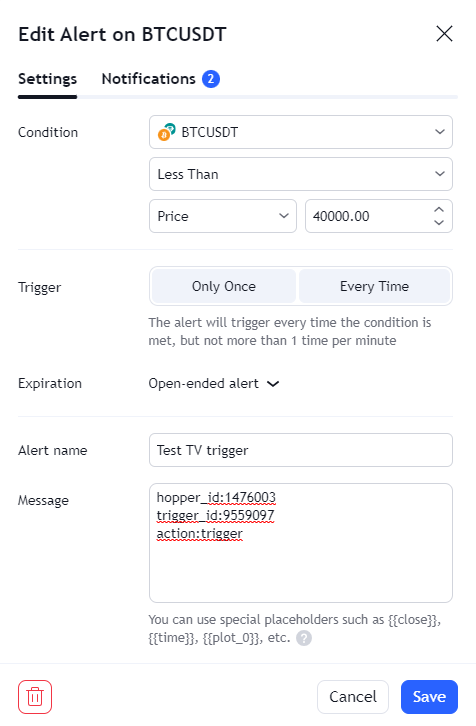
- Füge die generierte Benachrichtigungsnachricht in TradingView unter "Einstellungen" ein.
- Klicke auf "Speichern". Dein Trigger ist bereit.