Jak tworzyć wyzwalacze za pomocą alertów TradingView
Ten przewodnik pokazuje, jak używać alertów TradingView do uruchamiania wyzwalaczy Cryptohopper.
Wymagania wstępne
- Konto Cryptohopper.
- Subskrypcja Explorer, Adventurer lub Hero subscription.
- Płatna subskrypcja TradingView.
- Zrozumienie czym są wyzwalacze.
Kroki
Skonfiguruj wyzwalacz w Cryptohopper
- Przejdź do swojej konfiguracji podstawowej, kliknij "Triggers" i kliknij "New".
- Nadaj swojemu wyzwalaczowi nazwę i włącz go.
- Pozostaw "Select exchange", "Select market" i "Select candle size" bez zmian.
- Wybierz "TradingView" jako wskaźnik.
- Wybierz akcję, którą ma wykonać wyzwalacz.
- Ustaw czas odnowienia w minutach, godzinach lub dniach.
Połącz z TradingView
- Przejdź do aplikacji TradingView w Cryptohopper i skopiuj adres URL webhooka.
- Otwórz TradingView i wybierz rynek, którego chcesz użyć dla alertu.
- Kliknij przycisk alertu i przejdź do zakładki "Notifications".
- Wklej adres URL webhooka w pole Webhook URL.
- Wróć do generatora alertów Cryptohopper i wybierz "Trigger" jako akcję.
- Wybierz bota i wyzwalacz dla tego alertu, następnie kliknij "Generate".
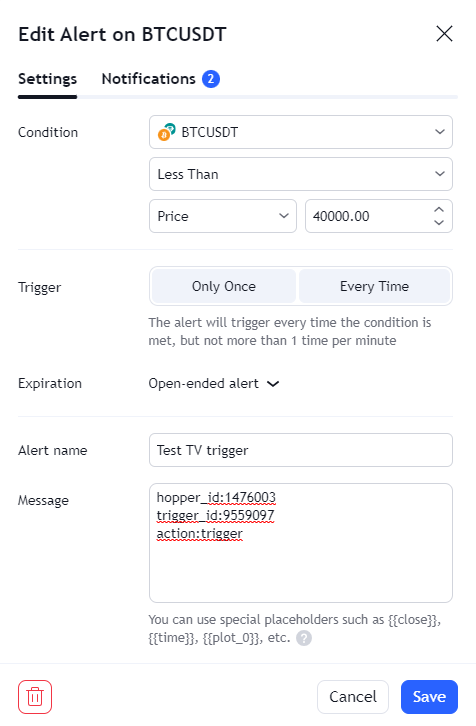
- Wklej wygenerowany komunikat alertu do TradingView w sekcji "Settings".
- Kliknij "Save". Twój wyzwalacz jest gotowy.