Come creare Triggers con gli Alert di TradingView
Questa guida ti mostra come utilizzare gli Alert di TradingView per attivare i Triggers di Cryptohopper.
Prerequisiti
- Un account Cryptohopper.
- Un abbonamento Explorer, Adventurer o Hero.
- Un abbonamento TradingView a pagamento.
- Una comprensione di cosa sono i Triggers.
Passaggi
Configura il Trigger in Cryptohopper
- Vai alla tua Baseconfig, clicca su "Triggers" e clicca su "Nuovo".
- Dai un nome al tuo Trigger e abilitalo.
- Lascia invariati "Seleziona exchange", "Seleziona mercato" e "Seleziona timeframe candela".
- Seleziona "TradingView" come indicatore.
- Seleziona l'Azione che vuoi che il Trigger esegua.
- Imposta il periodo di cooldown in minuti, ore o giorni.
Connettiti a TradingView
- Vai all'app TradingView di Cryptohopper e copia l'URL del Webhook.
- Apri TradingView e seleziona il mercato che vuoi utilizzare per l'alert.
- Clicca sul pulsante Alert e vai alla scheda "Notifiche".
- Incolla l'URL del Webhook nel campo URL del Webhook.
- Torna al Generatore di Alert di Cryptohopper e seleziona "Trigger" come Azione.
- Seleziona il bot e il Trigger per questo alert, poi clicca su "Genera".
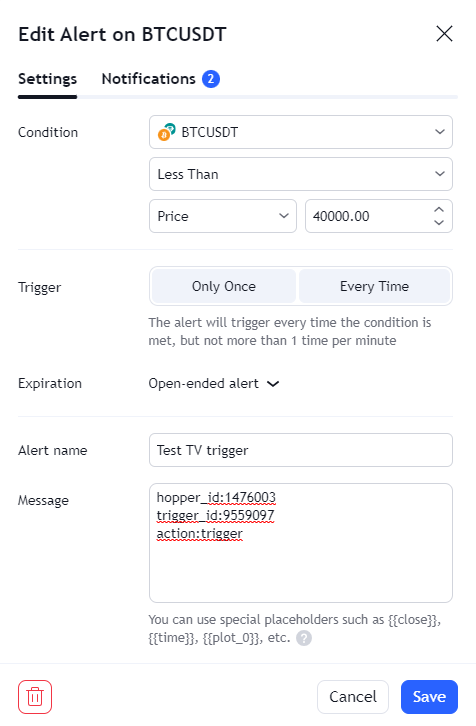
- Incolla il messaggio di alert generato in TradingView sotto "Impostazioni".
- Clicca su "Salva". Il tuo Trigger è pronto.