Como configurar um Modelo
Este guia mostra como configurar um Modelo no seu bot de trading.
Pré-requisitos
- Uma assinatura Explorer, Adventurer ou Hero.
Opção 1 — Carregar um modelo através da Configuração Base do seu bot
Se você já tiver baixado um modelo, pule para o passo 7.
- Acesse sua conta Cryptohopper e clique em "Marketplace".
- Clique em "Modelos".
- Escolha um modelo. Não tem certeza de qual escolher? Veja como selecionar um modelo ?
- Clique no modelo e clique em "Baixar" ou "Comprar". Complete o pagamento se necessário.
- Clique em "Meus bots" e abra o bot onde você deseja carregar o modelo.
- Clique em "Configuração" e depois em "Configuração Base".
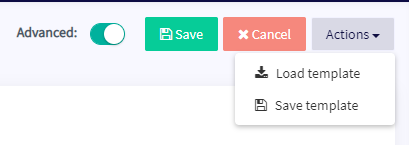
- Clique em "Ações" e depois em "Carregar Modelo".
- Selecione o modelo que você deseja usar e clique em "Carregar Modelo".
- Clique em "Salvar".
informação
Alguns modelos incluem uma assinatura de sinalizador e irão redirecionar você para uma tela de pagamento durante a configuração.
Opção 2 — Carregar um modelo através da Minha Biblioteca
Se você já tiver baixado um modelo, pule para o passo 5.
- Acesse sua conta Cryptohopper e clique em "Marketplace".
- Clique em "Modelos".
- Escolha um modelo. Não tem certeza de qual escolher? Veja como selecionar um modelo ?
- Clique no modelo e clique em "Baixar" ou "Comprar". Complete o pagamento se necessário.
- Clique em "Minha Biblioteca" e depois em "Modelos".
- Clique em "Carregar" no modelo que você deseja usar.
- Escolha uma das seguintes opções:
- Criar um novo bot — selecione a corretora, preencha sua Chave de API, ou habilite Paper Trading.
- Carregar em um bot existente — selecione o bot que você deseja usar.
- Clique em "Salvar".
informação
Alguns modelos incluem uma assinatura de sinalizador e irão redirecionar você para uma tela de pagamento durante a configuração.