Come configurare un Template
Questa guida ti mostra come configurare un Template sul tuo trading bot.
Prerequisiti
- Un abbonamento Explorer, Adventurer o Hero subscription.
Opzione 1 — Carica un template tramite il Baseconfig del tuo bot
Se hai già scaricato un template, passa al punto 7.
- Vai al tuo account Cryptohopper e clicca su "Marketplace".
- Clicca su "Templates".
- Scegli un template. Non sei sicuro di quale scegliere? Vedi come selezionare un template ?
- Clicca sul template e clicca su "Download" o "Buy". Completa il pagamento se richiesto.
- Clicca su "My bots" e apri il bot dove vuoi caricare il template.
- Clicca su "Configuration" poi "Baseconfig".
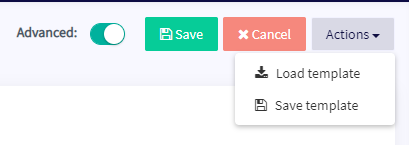
- Clicca su "Actions" poi "Load Template".
- Seleziona il template che vuoi utilizzare e clicca su "Load Template".
- Clicca su "Save".
info
Alcuni template includono un abbonamento signaler e ti reindirizzeranno a una schermata di pagamento durante la configurazione.
Opzione 2 — Carica un template tramite My Library
Se hai già scaricato un template, passa al punto 5.
- Vai al tuo account Cryptohopper e clicca su "Marketplace".
- Clicca su "Templates".
- Scegli un template. Non sei sicuro di quale scegliere? Vedi come selezionare un template ?
- Clicca sul template e clicca su "Download" o "Buy". Completa il pagamento se richiesto.
- Clicca su "My Library" poi "Templates".
- Clicca su "Load" sul template che vuoi utilizzare.
- Scegli una delle seguenti opzioni:
- Create a new bot — seleziona l'exchange, inserisci la tua chiave API, oppure attiva il Paper Trading.
- Load into an existing bot — seleziona il bot che vuoi utilizzare.
- Clicca su "Save".
info
Alcuni template includono un abbonamento signaler e ti reindirizzeranno a una schermata di pagamento durante la configurazione.