Cómo configurar una Plantilla
Esta guía te muestra cómo configurar una Plantilla en tu bot de trading.
Prerrequisitos
- Una suscripción subscription Explorer, Adventurer o Hero.
Opción 1 — Cargar una plantilla a través de la Configuración base de tu bot
Si ya tienes una plantilla descargada, salta al paso 7.
- Ve a tu cuenta de Cryptohopper y haz clic en "Marketplace".
- Haz clic en "Plantillas".
- Elige una plantilla. ¿No estás seguro de cuál elegir? Consulta cómo seleccionar una plantilla
- Haz clic en la plantilla y haz clic en "Descargar" o "Comprar". Completa el pago si es necesario.
- Haz clic en "Mis bots" y abre el bot donde quieres cargar la plantilla.
- Haz clic en "Configuración" y luego en "Configuración base".
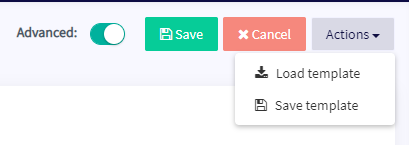
- Haz clic en "Acciones" y luego en "Cargar Plantilla".
- Selecciona la plantilla que quieres usar y haz clic en "Cargar Plantilla".
- Haz clic en "Guardar".
información
Algunas plantillas incluyen una suscripción de señalizador y te redirigirán a una pantalla de pago durante la configuración.
Opción 2 — Cargar una plantilla a través de Mi Biblioteca
Si ya tienes una plantilla descargada, salta al paso 5.
- Ve a tu cuenta de Cryptohopper y haz clic en "Marketplace".
- Haz clic en "Plantillas".
- Elige una plantilla. ¿No estás seguro de cuál elegir? Consulta cómo seleccionar una plantilla
- Haz clic en la plantilla y haz clic en "Descargar" o "Comprar". Completa el pago si es necesario.
- Haz clic en "Mi Biblioteca" y luego en "Plantillas".
- Haz clic en "Cargar" en la plantilla que quieres usar.
- Elige una de las siguientes opciones:
- Crear un nuevo bot — selecciona el exchange, completa tu Clave API, o habilita el Comercio de papel.
- Cargar en un bot existente — selecciona el bot que quieres usar.
- Haz clic en "Guardar".
información
Algunas plantillas incluyen una suscripción de señalizador y te redirigirán a una pantalla de pago durante la configuración.