How to set up a Template
This guide shows you how to set up a Template on your trading bot.
Prerequisites
- An Explorer, Adventurer, or Hero subscription.
Option 1 — Load a template via your bot's Baseconfig
If you already have a template downloaded, skip to step 7.
- Go to your Cryptohopper account and click "Marketplace".
- Click "Templates".
- Choose a template. Not sure which one to pick? See how to select a template ?
- Click on the template and click "Download" or "Buy". Complete payment if required.
- Click "My bots" and open the bot where you want to load the template.
- Click "Configuration" than "Baseconfig".
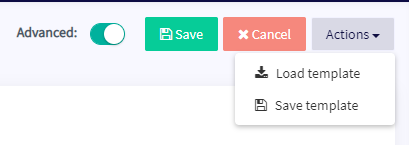
- Click "Actions" than "Load Template".
- Select the template you want to use and click "Load Template".
- Click "Save".
info
Some templates include a signaler subscription and will redirect you to a payment screen during setup.
Option 2 — Load a template via My Library
If you already have a template downloaded, skip to step 5.
- Go to your Cryptohopper account and click "Marketplace".
- Click "Templates".
- Choose a template. Not sure which one to pick? See how to select a template ?
- Click on the template and click "Download" or "Buy". Complete payment if required.
- Click "My Library" than "Templates".
- Click "Load" on the template you want to use.
- Choose one of the following:
- Create a new bot — select the exchange, fill in your API Key, or enable Paper Trading.
- Load into an existing bot — select the bot you want to use.
- Click "Save".
info
Some templates include a signaler subscription and will redirect you to a payment screen during setup.