Wie man eine Vorlage einrichtet
Diese Anleitung zeigt dir, wie du eine Vorlage auf deinem Trading-Bot einrichtest.
Voraussetzungen
- Ein Explorer-, Adventurer- oder Hero-Abonnement.
Option 1 — Lade eine Vorlage über die Baseconfig deines Bots
Wenn du bereits eine Vorlage heruntergeladen hast, springe zu Schritt 7.
- Gehe zu deinem Cryptohopper-Konto und klicke auf "Marketplace".
- Klicke auf "Vorlagen".
- Wähle eine Vorlage aus. Nicht sicher, welche du wählen sollst? Siehe wie man eine Vorlage auswählt ?
- Klicke auf die Vorlage und klicke auf "Herunterladen" oder "Kaufen". Schließe die Zahlung ab, falls erforderlich.
- Klicke auf "Meine Bots" und öffne den Bot, in den du die Vorlage laden möchtest.
- Klicke auf "Konfiguration" und dann auf "Baseconfig".
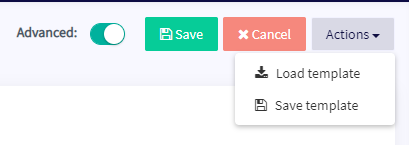
- Klicke auf "Aktionen" und dann auf "Vorlage laden".
- Wähle die Vorlage aus, die du verwenden möchtest, und klicke auf "Vorlage laden".
- Klicke auf "Speichern".
Info
Einige Vorlagen beinhalten ein Signalgeber-Abonnement und werden dich während der Einrichtung zu einem Zahlungsbildschirm weiterleiten.
Option 2 — Lade eine Vorlage über Meine Bibliothek
Wenn du bereits eine Vorlage heruntergeladen hast, springe zu Schritt 5.
- Gehe zu deinem Cryptohopper-Konto und klicke auf "Marketplace".
- Klicke auf "Vorlagen".
- Wähle eine Vorlage aus. Nicht sicher, welche du wählen sollst? Siehe wie man eine Vorlage auswählt ?
- Klicke auf die Vorlage und klicke auf "Herunterladen" oder "Kaufen". Schließe die Zahlung ab, falls erforderlich.
- Klicke auf "Meine Bibliothek" und dann auf "Vorlagen".
- Klicke auf "Laden" bei der Vorlage, die du verwenden möchtest.
- Wähle eine der folgenden Optionen:
- Erstelle einen neuen Bot — wähle die Börse aus, gib deinen API-Schlüssel ein oder aktiviere Paper-Trading.
- Lade in einen bestehenden Bot — wähle den Bot aus, den du verwenden möchtest.
- Klicke auf "Speichern".
Info
Einige Vorlagen beinhalten ein Signalgeber-Abonnement und werden dich während der Einrichtung zu einem Zahlungsbildschirm weiterleiten.