Wie man den Bulk Bot-Manager verwendet
Dieser Leitfaden zeigt dir, wie du mehrere Bots gleichzeitig mit dem Bulk Bot-Manager verwaltest.
Voraussetzungen
- Ein aktives Cryptohopper-Konto.
- Mindestens 3 Bot-Abonnements.
Schritte
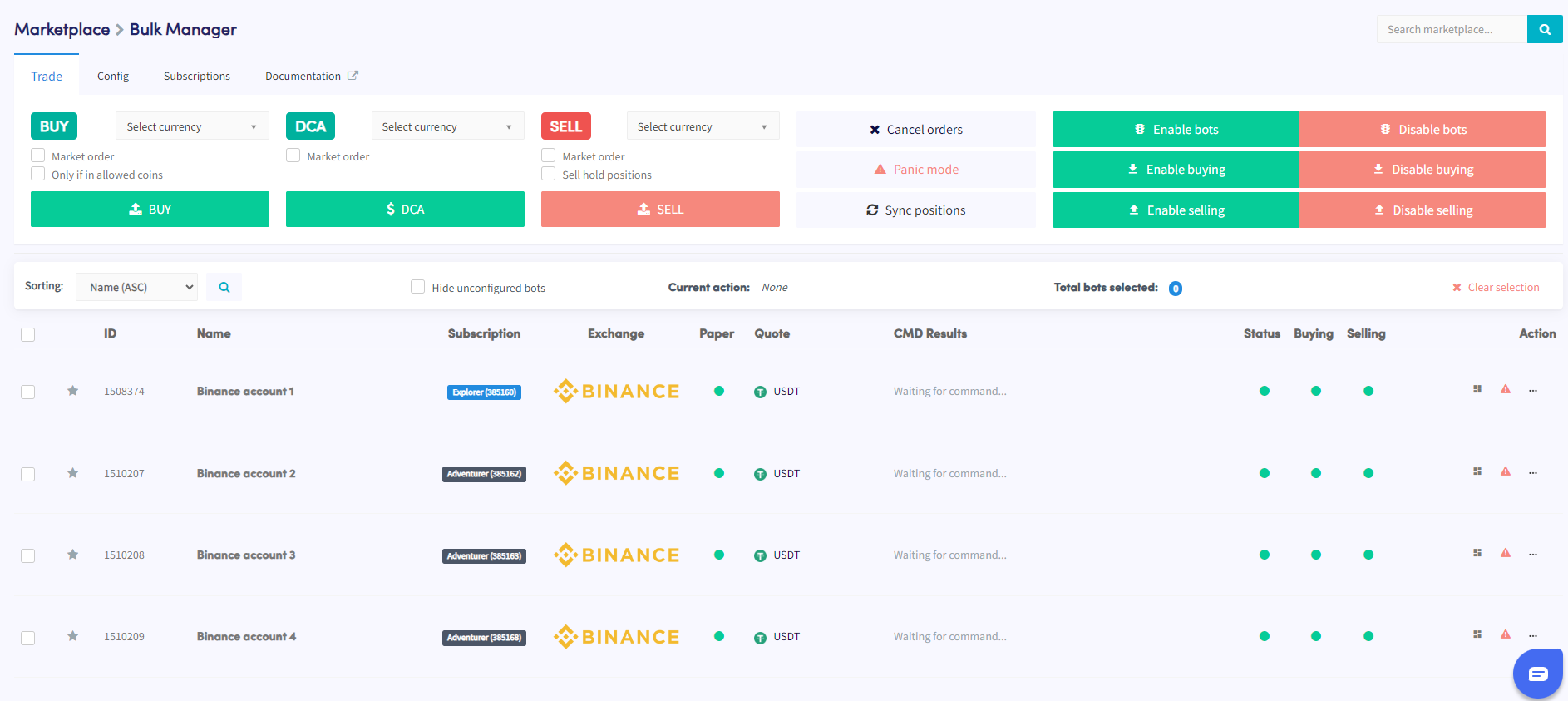
- Greife auf den Marketplace zu und wähle den Bereich "Apps" aus.
- Klicke auf den Bulk Manager.
- Wähle die Trading-Bots aus, die du verwalten möchtest, indem du die Kontrollkästchen verwendest.
- Wähle die Art der Aktion aus, die du ausführen möchtest — Trade, Config oder Abonnements.
- Konfiguriere die Details der gewählten Aktion — wenn du beispielsweise Trade ausgewählt hast, lege das Währungspaar, die Kauf-/Verkaufsstrategie und die Ordergröße fest.
- Führe die Aktion aus, um sie auf die ausgewählten Bots anzuwenden.
- Überwache den Bereich "Command" in deiner Bot-Übersicht, um zu überprüfen, ob die Aktion erfolgreich abgeschlossen wurde.
Tipp
Brauchst du Hilfe bei der Verwendung des Bulk Bot-Managers? Schreibe uns eine E-Mail an [email protected].