Jak używać Menedżera Botów Zbiorczych
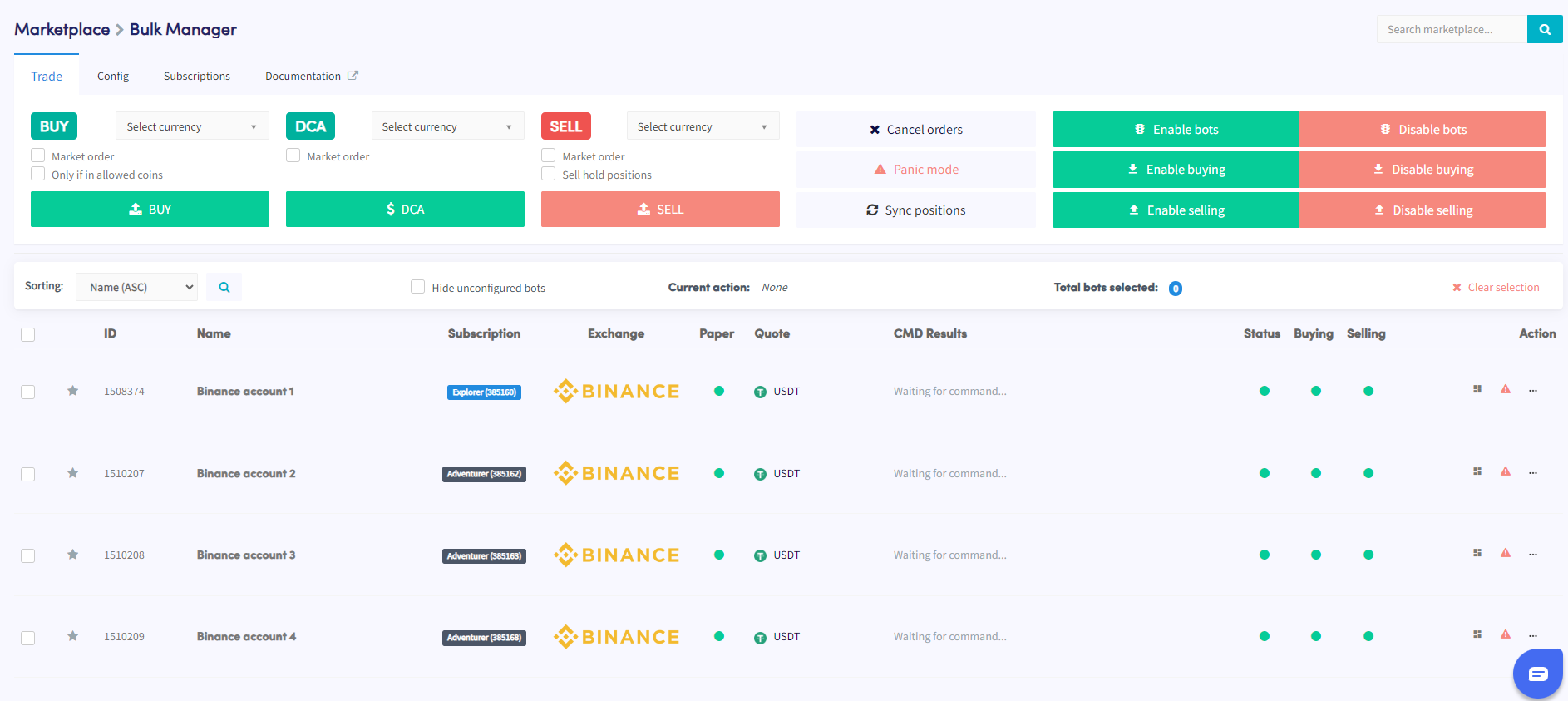
Ten przewodnik pokazuje, jak zarządzać wieloma botami jednocześnie za pomocą Menedżera Botów Zbiorczych.
Wymagania wstępne
- Aktywne konto Cryptohopper.
- Minimum 3 subskrypcje botów.
Kroki
- Wejdź do Rynku i wybierz sekcję "Aplikacje".
- Kliknij na Bulk Manager.
- Wybierz boty handlowe, którymi chcesz zarządzać, używając pól wyboru.
- Wybierz typ działania do wykonania — transakcje, konfiguracja lub subskrypcje.
- Skonfiguruj szczegóły wybranego działania — na przykład, jeśli wybrałeś Transakcje, określ parę walutową, strategię kupna/sprzedaży i wielkość zlecenia.
- Wykonaj działanie, aby zastosować je do wybranych botów.
- Monitoruj sekcję Komendy w przeglądzie swojego bota, aby sprawdzić, czy działanie zostało wykonane pomyślnie.
wskazówka
Potrzebujesz pomocy w korzystaniu z Menedżera Botów Zbiorczych? Napisz do nas na [email protected].