Cómo usar el Administrador de Bots en Masa
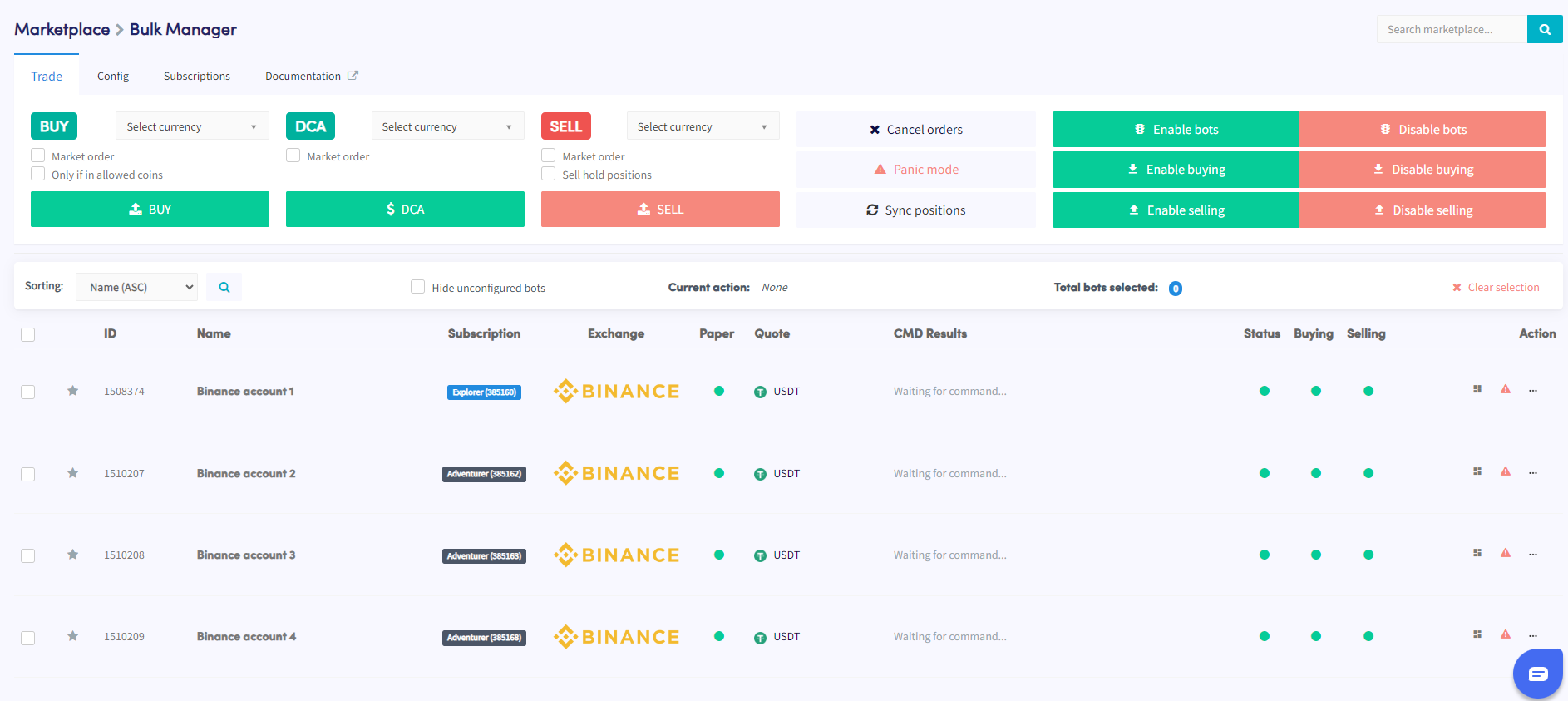
Esta guía te muestra cómo administrar múltiples bots simultáneamente usando el Administrador de Bots en Masa.
Prerrequisitos
- Una cuenta de Cryptohopper activa.
- Un mínimo de 3 suscripciones de bot.
Pasos
- Accede al Marketplace y selecciona la sección "Apps".
- Haz clic en el Bulk Manager.
- Selecciona los bots de trading que deseas administrar usando las casillas de verificación.
- Elige el tipo de acción a realizar — trade, config o subscriptions.
- Configura los detalles de la acción elegida — por ejemplo, si seleccionaste Trade, especifica el par de monedas, la estrategia de compra/venta y el tamaño de la orden.
- Ejecuta la acción para aplicarla a los bots seleccionados.
- Monitorea la sección Command en tu vista general del bot para verificar si la acción se completó exitosamente.
consejo
¿Necesitas ayuda usando el Administrador de Bots en Masa? Envíanos un correo electrónico a [email protected].