Comment utiliser le gestionnaire de plusieurs bots
Ce guide te montre comment gérer plusieurs bots simultanément en utilisant le gestionnaire de plusieurs bots.
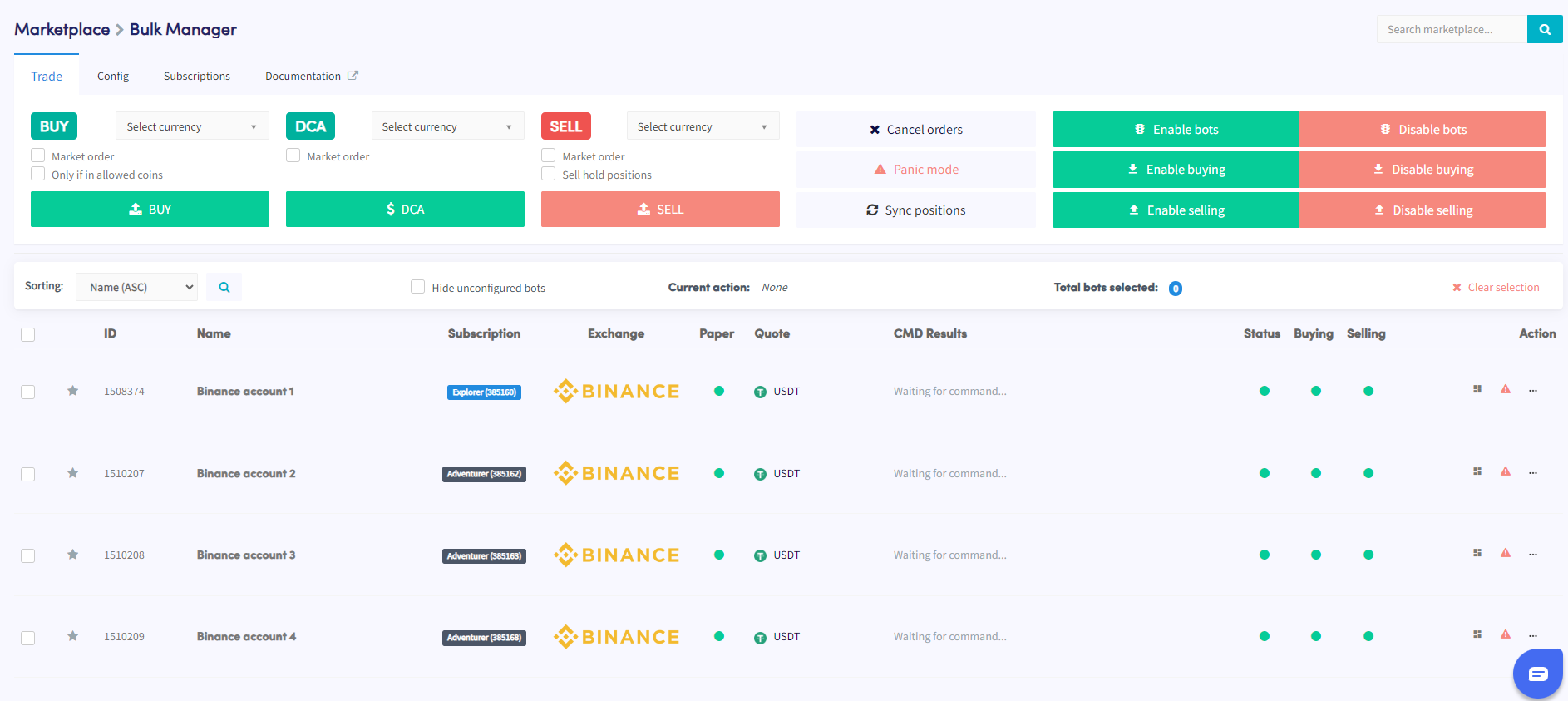
Conditions
- Un compte Cryptohopper actif.
- Un minimum de 3 abonnements bot.
Étapes
- Accède au marketplace et sélectionne la section "Apps".
- Clique sur le Bulk Manager.
- Sélectionne les trading bots que tu veux gérer en utilisant les cases à cocher.
- Choisis le type d'action à effectuer — trade, config., ou abonnements.
- Configure les détails de l'action choisie — par exemple, si tu as sélectionné Trade, spécifie la paire de monnaies, la stratégie d'achat/vente et la taille de l'ordre.
- Exécute l'action pour l'appliquer aux bots sélectionnés.
- Surveille la section Command dans ta vue d'ensemble du bot pour vérifier si l'action s'est terminée avec succès.
astuce
Besoin d'aide pour utiliser le gestionnaire de plusieurs bots ? Envoie-nous un e-mail à [email protected].