Como pagar com seu cartão de crédito (Paddle)
Este guia mostra como pagar por uma assinatura do Cryptohopper usando um cartão de crédito via Paddle.
Pré-requisitos
- Uma conta Cryptohopper.
- Disposição para comprar uma assinatura usando um cartão de crédito.
informação
Se você precisa de notas fiscais para fins contábeis, use as notas fiscais do Paddle — elas incluem impostos/IVA e mostram o valor exato cobrado.
Etapas
- Faça login na sua conta Cryptohopper.
- Clique em "Assinaturas".
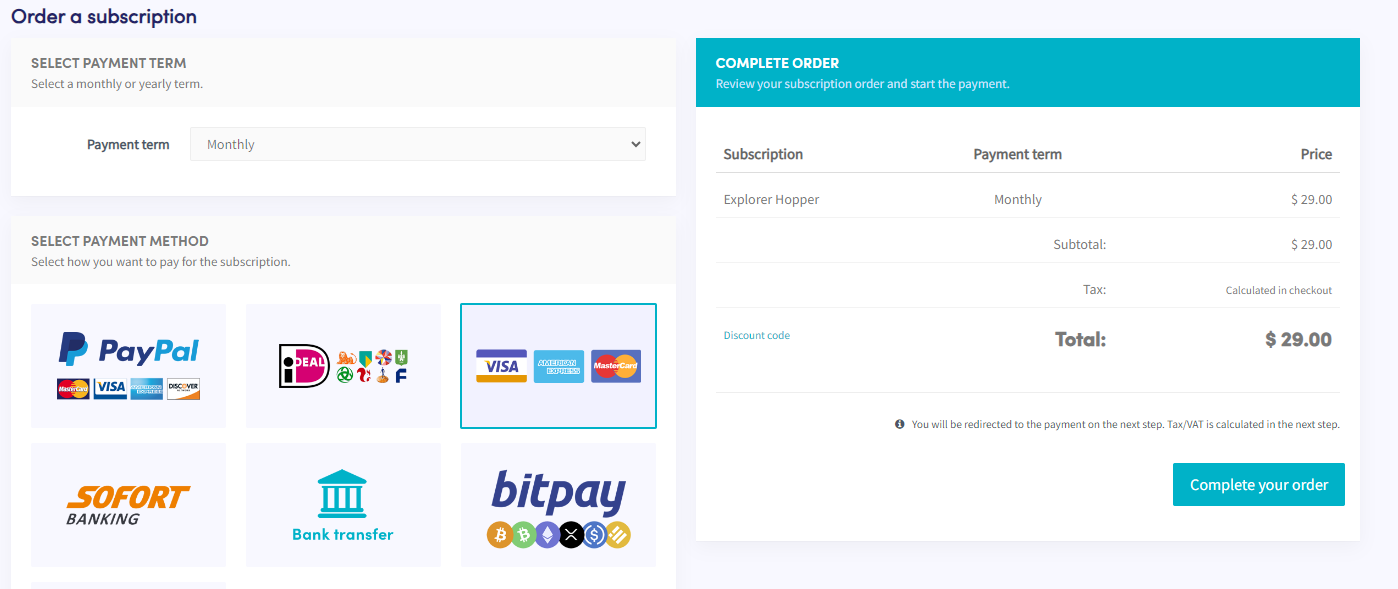
- Clique em "Nova assinatura".
- Selecione a assinatura que você deseja comprar.
- Selecione o prazo de pagamento.
- Clique no bloco mostrando Visa, American Express e Mastercard.
- Clique em "Concluir seu pedido". Você será redirecionado para o Paddle.
- Clique em "Pagar com cartão". Observação: o preço pode diferir ligeiramente devido a impostos locais ou IVA. Se você tiver uma conta comercial, pode adicionar seu número de IVA.
- Preencha os detalhes do seu cartão.
- Clique em "Assinar agora".
- Após o pagamento, você receberá um e-mail de confirmação.