Comment payer avec ta carte de crédit (Paddle)
Ce guide te montre comment payer un abonnement Cryptohopper avec une carte de crédit via Paddle.
Conditions
- Un compte Cryptohopper.
- Prêt à acheter un abonnement avec une carte de crédit.
info
Si tu as besoin de factures à des fins comptables, utilise les factures de Paddle — elles incluent les taxes/TVA et indiquent le montant exact débité.
Étapes
- Connecte-toi à ton compte Cryptohopper.
- Clique sur "Subscriptions".
- Clique sur "New subscription".
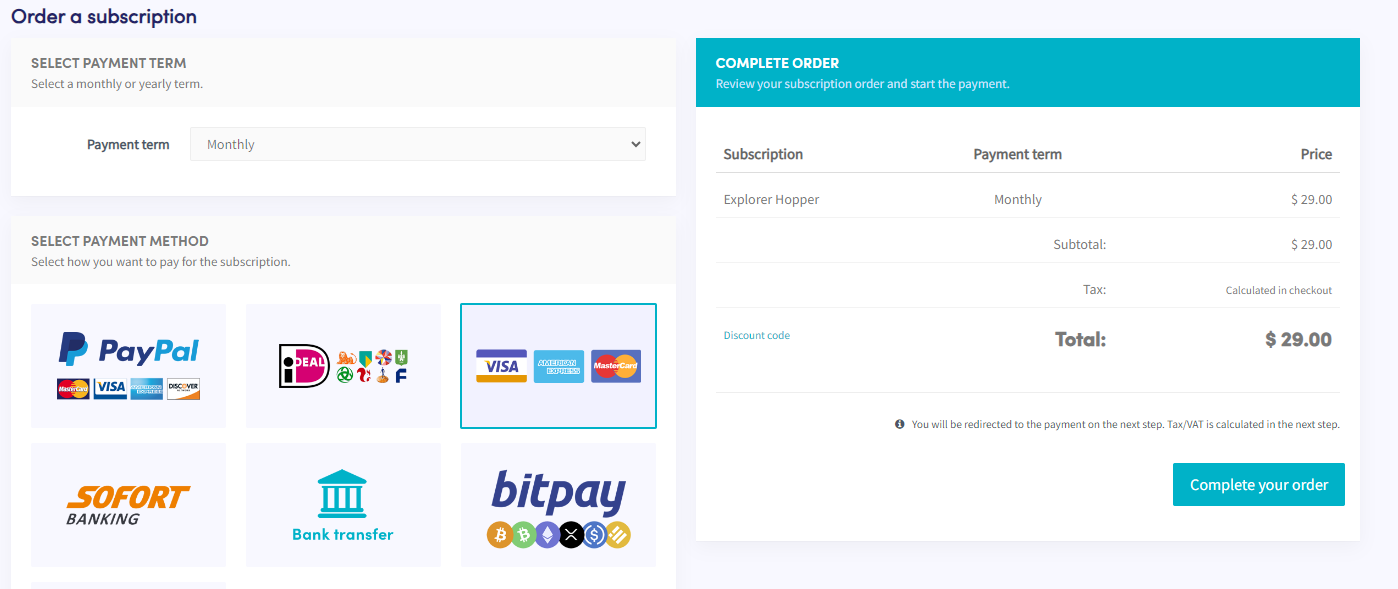
- Sélectionne l'abonnement que tu souhaites acheter.
- Sélectionne la durée de paiement.
- Clique sur la vignette affichant Visa, American Express et Mastercard.
- Clique sur "Complete your order". Tu seras redirigé vers Paddle.
- Clique sur "Pay by card". Remarque : le prix peut légèrement différer en raison des taxes locales ou de la TVA. Si tu as un compte professionnel, tu peux ajouter ton numéro de TVA.
- Remplis les détails de ta carte.
- Clique sur "Subscribe now".
- Après le paiement, tu recevras un e-mail de confirmation.