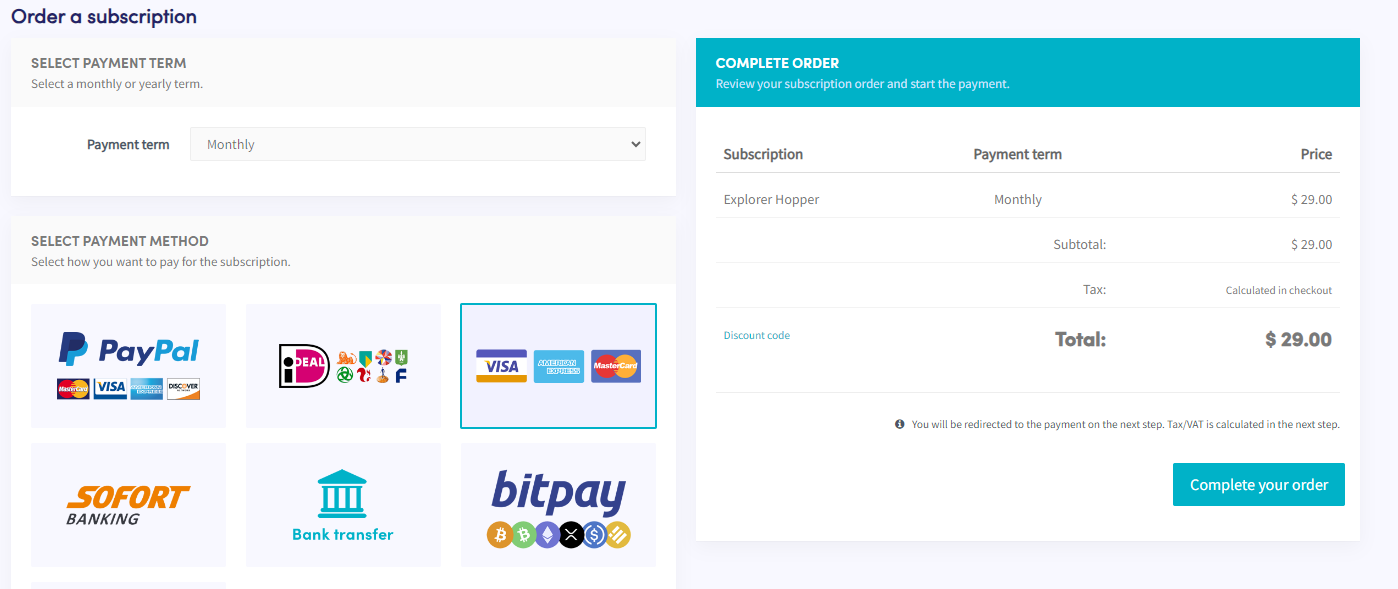
Come pagare con la tua carta di credito (Paddle)
Questa guida ti mostra come pagare un abbonamento Cryptohopper utilizzando una carta di credito tramite Paddle.
Prerequisiti
- Un account Cryptohopper.
- Disponibilità ad acquistare un abbonamento utilizzando una carta di credito.
info
Se hai bisogno di fatture per scopi contabili, utilizza le fatture di Paddle — includono tasse/IVA e mostrano l'importo esatto addebitato.
Passaggi
- Accedi al tuo account Cryptohopper.
- Clicca su "Abbonamenti".
- Clicca su "Nuovo abbonamento".
- Seleziona l'abbonamento che vuoi acquistare.
- Seleziona il periodo di pagamento.
- Clicca sul riquadro che mostra Visa, American Express e Mastercard.
- Clicca su "Completa il tuo ordine". Verrai reindirizzato a Paddle.
- Clicca su "Paga con carta". Nota: il prezzo potrebbe differire leggermente a causa di tasse locali o IVA. Se hai un account aziendale, puoi aggiungere il tuo numero IVA.
- Inserisci i dettagli della tua carta.
- Clicca su "Iscriviti ora".
- Dopo il pagamento, riceverai un'email di conferma.