Jak płacić kartą kredytową (Paddle)
Ten przewodnik pokazuje, jak zapłacić za subskrypcję Cryptohopper kartą kredytową przez Paddle.
Wymagania wstępne
- Konto Cryptohopper.
- Gotowość do zakupu subskrypcji kartą kredytową.
info
Jeśli potrzebujesz faktur do celów księgowych, użyj faktur Paddle — zawierają podatek/VAT i pokazują dokładną obciążoną kwotę.
Kroki
- Zaloguj się do swojego konta Cryptohopper.
- Kliknij "Subscriptions".
- Kliknij "New subscription".
- Wybierz subskrypcję, którą chcesz kupić.
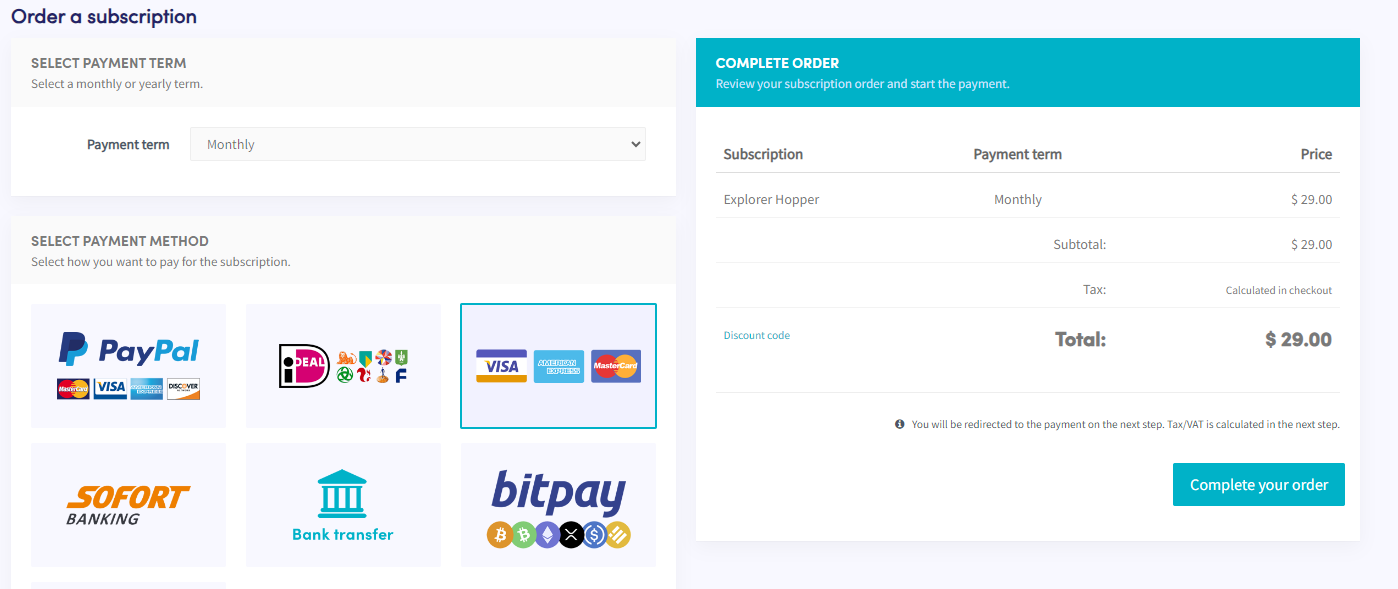
- Wybierz okres płatności.
- Kliknij kafelek pokazujący Visa, American Express i Mastercard.
- Kliknij "Complete your order". Zostaniesz przekierowany do Paddle.
- Kliknij "Pay by card". Uwaga: cena może się nieznacznie różnić ze względu na lokalne podatki lub VAT. Jeśli masz konto firmowe, możesz dodać swój numer VAT.
- Wypełnij dane swojej karty.
- Kliknij "Subscribe now".
- Po dokonaniu płatności otrzymasz e-mail z potwierdzeniem.