Перейти к основному содержанию

How to set up email notifications

This tutorial shows you how to set up e-mail notifications.

Prerequisites

Before you begin, check the following:

How to set up e-mail notifications

  1. Log in to your Cryptohopper account.
  2. Click the profile button in the upper right corner.
  3. Click “My account”.
  4. Click “User Profile”.
  5. Click “Notifications”.
  6. Switch the toggles of the notifications you want to receive.
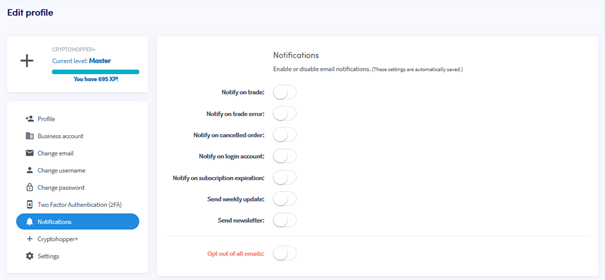
Notificaties

Была ли эта статья полезной?

Содержание

Нужна помощь?

Не можешь найти ответ на свой вопрос?Проверь FAQСвязаться с поддержкой

Начни торговать с Cryptohopper бесплатно!

Бесплатно в использовании — кредитная карта не требуется

Let's get started
Скоро выйдут новые приложения!