Co to jest diagnostyka twojego bota handel testowy
Przewodnik diagnozowania i naprawiania typowych problemów z twoim botem handel testowy.
Subskrypcja
Potrzebujesz ważnej subskrypcji bota, aby korzystać z bota handel testowy. Nie musisz przypisywać subskrypcji specjalnie do bota handel testowy — jedna subskrypcja obejmuje jednocześnie bot na żywo i bot handel testowy. Nie możesz jednak uruchamiać wielu botów handel testowy w ramach jednej subskrypcji. Jeśli włączysz więcej niż jeden, przestaną handlować i będziesz musiał ponownie włączyć ten, którego chcesz użyć.
- 1 subskrypcja → 1 bot na żywo + 1 bot handel testowy
- 5 subskrypcji → 5 botów na żywo + 5 botów handel testowy
Możesz sprawdzić liczbę dostępnych botów handel testowy w "Subskrypcje".
Włącz swojego bota
Sprawdź trzy przełączniki na swoim pulpicie nawigacyjnym:
Pierwszy przełącznik — Bot włączony Gdy wyłączony, żadne informacje nie są wysyłane do giełdy ani z niej odbierane. Twój bot nie działa.
Drugi przełącznik — Kupowanie włączone Gdy włączone, bot automatycznie kupuje w oparciu o twoją Konfiguracja podstawowa, Pule konfiguracji, Dostawcy sygnałów lub Wyzwalacze. Gdy wyłączone, nie otwierają się nowe transakcje. Uwaga: Wyzwalacze mogą również wpływać na zachowanie kupowania.
Trzeci przełącznik — Sprzedawanie włączone Gdy włączone, bot automatycznie sprzedaje w oparciu o twoją Konfiguracja podstawowa, Pule konfiguracji, Dostawcy sygnałów lub Wyzwalacze. Gdy wyłączone, żadne pozycje nie są sprzedawane.
Środki
Sprawdź swoje fałszywe aktywa w "Aktualne aktywa" na swoim pulpicie nawigacyjnym. Potrzebujesz wystarczającej ilości waluty kwotowanej, aby handlować automatycznie — celem twojego bota jest zwiększenie tej waluty. Ponieważ używasz bota handel testowy, możesz w każdej chwili wpłacić dodatkowe fałszywe środki.
Waluty
Handlując bardzo małymi walutami, nawet drobne zmiany cen mogą skutkować dużymi procentowymi zyskami lub stratami. Jest to szczególnie istotne przy użyciu Bitcoin jako waluty kwotowanej.
Output
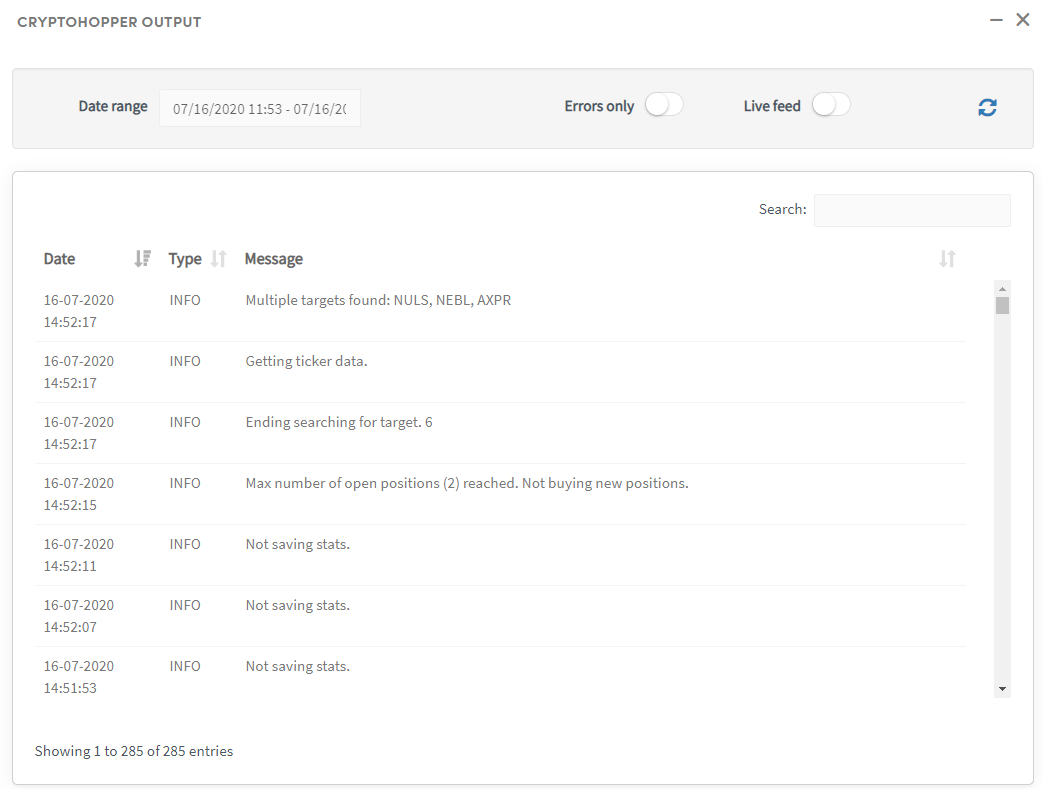

Monitoruj sekcję Output, aby zobaczyć, jak twój bot postępuje zgodnie ze swoją konfiguracją. Na przykład może pokazać, że bot osiągnął maksymalną liczbę otwartych pozycji lub maksymalną przydzieloną kwotę inwestycji.
Aby filtrować wyniki, wybierz określony okres czasu — maksimum to 500 wpisów. Jeśli nie możesz znaleźć tego, czego szukasz, wybierz krótszy przedział czasowy.
Błędy
Dobrze działający bot handel testowy nie powinien pokazywać błędów w Output. Błędy mogą czasami pojawić się podczas aktualizacji platformy. Jeśli doświadczasz uporczywych błędów, skontaktuj się z naszym zespołem wsparcia w celu uzyskania pomocy.