Passer au contenu principal

How to find the overview of your bots

This tutorial shows you where you can find an overview of your bots.

Prerequisites

Before you begin, check the following:

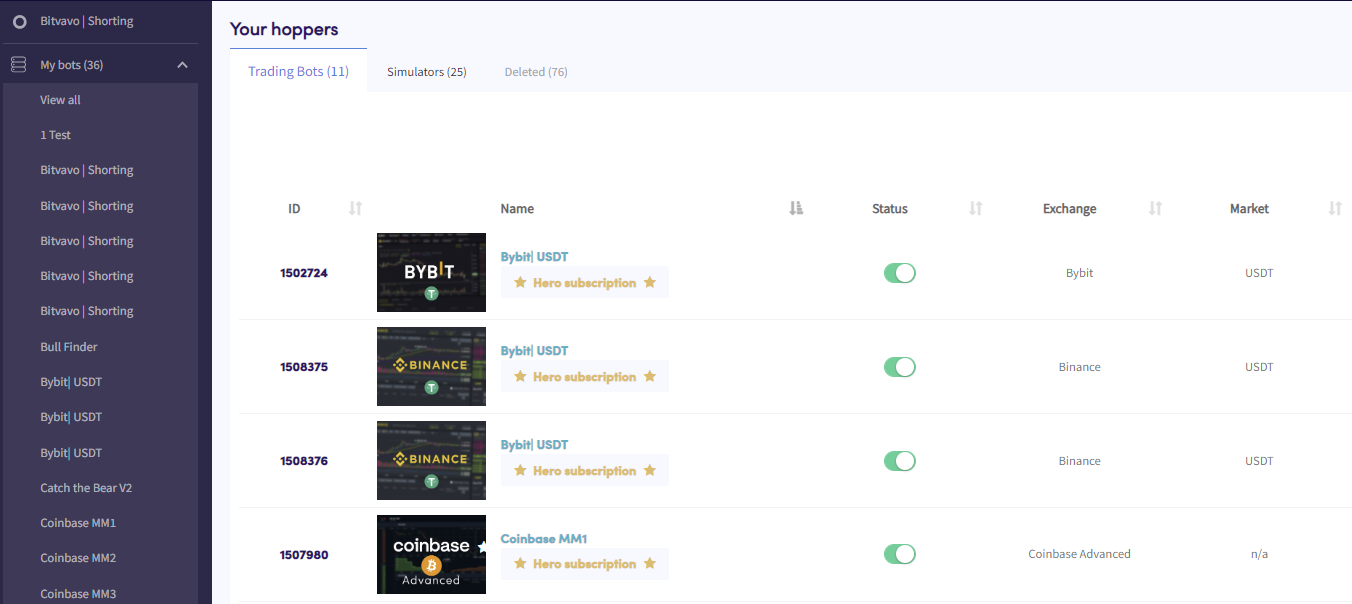
Find the overview of your bots

Bots overview

  1. Click in the top left section in your menu called “My bots”.
  2. Click “View all”.
  3. Click “Trading Bots”, “Simulators” or “Deleted” to see an overview of these types of bots.

Cet article t'a-t-il été utile ?

Contenu

Besoin d'aide ?

Tu ne trouves pas la réponse à ta question ?Consulter la F.A.Q.Contacter le support

Commence à trader avec Cryptohopper gratuitement !

Gratuit à utiliser – aucune carte de crédit requise

Let's get started
Nouvelles applications à venir bientôt !