Qué son los ajustes en el Config Pool
Una explicación de cada ajuste en el Config Pool — Ajustes básicos, Ajustes de compra, Estrategia, Stop dinámico de compra, Ajustes de venta, Estrategia de venta, Stop de pérdida, Stop dinámico de pérdida, Cerrar automáticamente, y Promedio de costo en dólares.
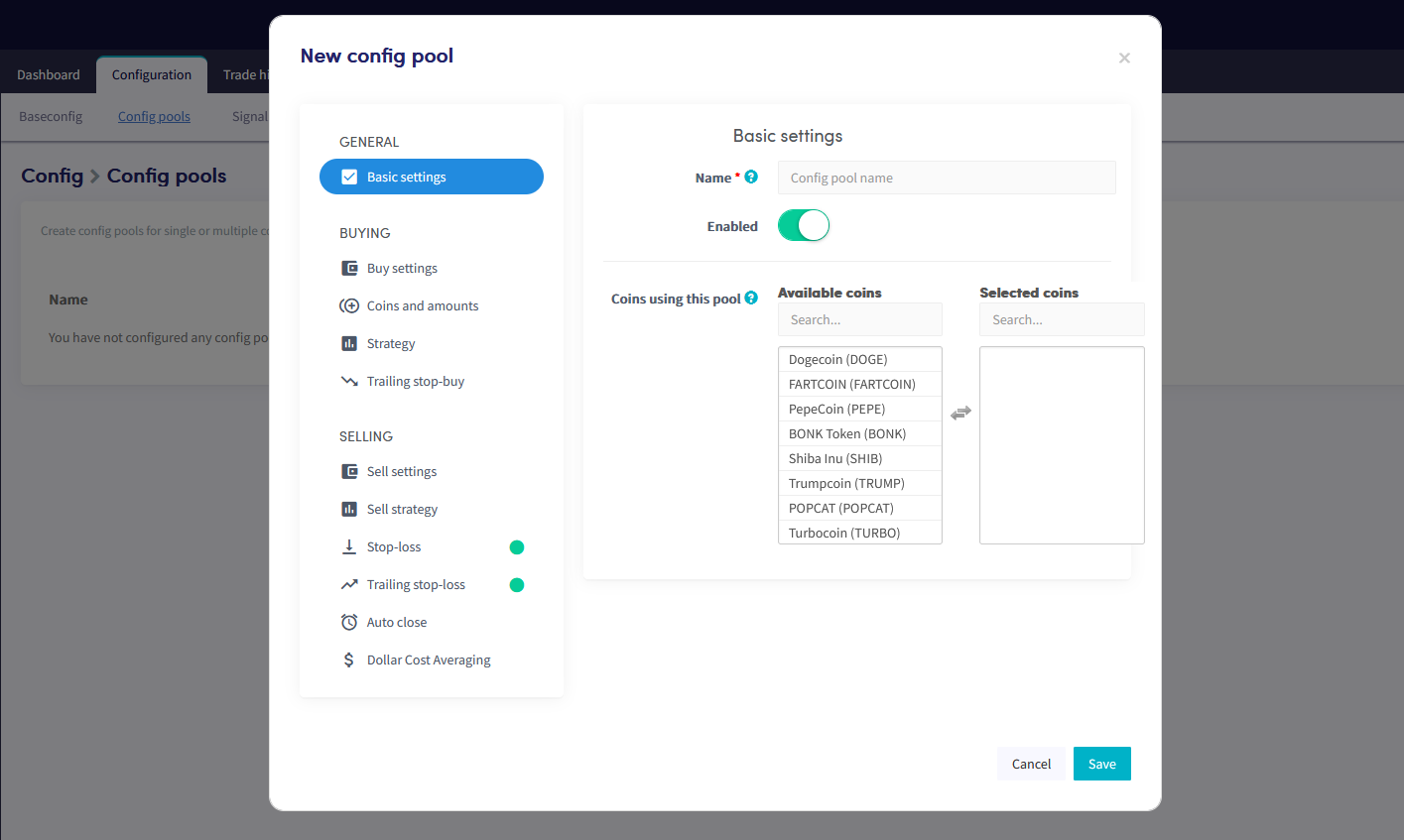
Ajustes básicos
Nombre Nombra el Config Pool.
Habilitar El Config Pool está habilitado por defecto cuando se crea. Solo desactiva esto para deshabilitarlo.
Monedas usando este pool Selecciona las monedas a las que se aplica este Config Pool.
Ajustes de compra
Tipo de orden El tipo de orden que el bot usa para comprar. Las órdenes de mercado se llenan inmediatamente pero pueden resultar en menores ganancias o mayores pérdidas durante bajo volumen o alta volatilidad. Las órdenes límite se colocan a un precio específico y usualmente tardan más en llenarse.
Tiempo máximo abierto de compra El número de minutos que una orden de compra permanece abierta antes de ser cancelada. Cancelar órdenes abiertas libera fondos reservados para nuevos trades.
Enfriamiento Cuando está habilitado, el bot no intentará comprar una moneda nuevamente dentro del período de enfriamiento configurado después de una compra o venta. Previene compras repetidas cuando múltiples señales de compra llegan en rápida sucesión.
Enfriamiento cuando Selecciona si el enfriamiento aplica después de compras, ventas, o ambas.
Período de enfriamiento El número de minutos que el bot permanece en enfriamiento para las monedas en este Config Pool.
Estrategia
Estrategia Cambia el selector para usar una estrategia para este Config Pool. Si una estrategia está habilitada en tu configuración base, esos ajustes se copian aquí y pueden ajustarse específicamente para este pool.
Stop Dinámico de Compra
Stop dinámico de compra Cambia el selector para habilitar el Stop dinámico de compra. Si está habilitado en tu configuración base, esos ajustes se copian aquí y pueden ajustarse para este pool.
Porcentaje de stop dinámico de compra El porcentaje que el precio debe subir antes de que el stop dinámico de compra se active y se coloque una orden de compra.
Ajustes de venta
Tomar ganancia en El porcentaje de ganancia al cual el bot coloca una orden de venta. Copiado de tu configuración base — puede ajustarse para este pool.
Tipo de orden El tipo de orden que el bot usa para vender. Copiado de tu configuración base — puede cambiarse para este pool.
Tiempo máximo abierto de venta El número de minutos que una orden de venta permanece abierta antes de ser cancelada. Un tiempo corto permite que el bot reintente rápidamente pero puede resultar en órdenes parcialmente llenadas. Copiado de tu configuración base — puede ajustarse para este pool.
Estrategia de venta
Vender basado en estrategia Cuando está habilitado, el bot vende cuando tu estrategia de indicadores técnicos señala una venta. Importante: las posiciones pueden venderse con pérdida. Si está habilitado en tu configuración base, esos ajustes se copian aquí y pueden cambiarse para este pool.
Solo vender con ganancia Cuando está habilitado, solo las posiciones con ganancia se venden cuando tu estrategia o una Alerta de TradingView señala una venta. Anula otros ajustes de venta.
Porcentaje de venta en ganancia El porcentaje mínimo de ganancia requerido antes de que la estrategia venda una posición.
Stop de Pérdida
Habilitar Cambia el selector para activar el Stop de pérdida. Si está habilitado en tu configuración base, esos ajustes se copian aquí y pueden ajustarse para este pool.
Porcentaje de stop de pérdida El porcentaje que debe caer una posición antes de que el stop de pérdida active una venta. Ingresa un número positivo — por ejemplo, ingresa 2.5 para vender cuando el precio caiga un 2.5%.
Stop Dinámico de Pérdida
Stop dinámico de pérdida Cambia el selector para activar el Stop dinámico de pérdida. Si está habilitado en tu configuración base, esos ajustes se copian aquí y pueden ajustarse para este pool.
Porcentaje de Stop Dinámico de Pérdida El porcentaje que una moneda debe caer desde su pico antes de que el bot intente vender.
Preparar stop dinámico de pérdida El porcentaje de ganancia que una posición debe alcanzar antes de que el stop dinámico de pérdida se prepare. Por ejemplo, configúralo al 1%: el TSL se activa al 1% de ganancia, luego vende si el precio cae en el porcentaje del TSL.
Usar solo Stop dinámico de pérdida Cuando está habilitado, el bot solo usa el Stop dinámico de pérdida para vender. Tomar ganancia, Vender basado en estrategia, y Short basado en estrategia no activarán una venta.
Restablecer Stop de pérdida después de órdenes fallidas Cuando está habilitado, el Stop dinámico de pérdida se restablece después de una orden cancelada.
Solo vender con ganancia Cuando está habilitado, el bot no colocará una orden de venta si el Stop Dinámico de Pérdida resultaría en una pérdida.
Cerrar automáticamente
Habilitar Cuando está habilitado, todas las posiciones se venden después de un período de tiempo establecido — incluso con pérdida. Comúnmente usado por comerciantes y mineros que quieren convertir automáticamente a una moneda estable. Si está habilitado en tu configuración base, esos ajustes se copian aquí y pueden ajustarse para este pool.
Cerrar posición después de X tiempo abierto El tiempo que debe pasar antes de que el bot comience a vender todas las posiciones abiertas.
Promedio de costo en dólares
Promedio de costo en dólares Cambia el selector para habilitar el DCA. Si está habilitado en tu configuración base, esos ajustes se copian aquí y pueden ajustarse para este pool.
Tipo de orden El tipo de orden usado para compras DCA. Las órdenes de mercado se llenan inmediatamente; las órdenes límite se colocan a un precio específico y usualmente tardan más en llenarse.
DCA después de X tiempo abierto El tiempo que debe pasar después de que se abre una posición antes de que se cree una orden DCA. Útil para acumular gradualmente una moneda durante un período más largo.
Reintentos máximos de DCA El número máximo de órdenes DCA que el bot puede crear para una sola moneda. Se restablece después de cada venta exitosa. Evita establecer esto demasiado alto — puede resultar en pérdidas significativamente mayores.
Disparador de porcentaje establecido del DCA El porcentaje que el precio debe caer antes de que se coloque una nueva orden DCA. Ingresa un número positivo. Después de que se ejecuta una orden DCA y se fusionan las posiciones, el precio debe caer por este porcentaje nuevamente antes de que otro DCA se active. Si una orden límite no se llena a tiempo, considera usar órdenes de mercado.
Compra inmediata de DCA Cuando está habilitado, la orden DCA se activa tan pronto como se alcanza el porcentaje de pérdida, sin esperar una señal de estrategia. Nota: el bot puede comprar en un momento desfavorable.
Tamaño de orden DCA Qué tan grande es cada orden DCA en relación con tu posición actual:
- Duplicar — abre una orden DCA igual al tamaño total de todas las posiciones abiertas para esa moneda.
- Triplicar — abre una orden DCA del doble del tamaño de todas las posiciones abiertas para esa moneda.
- Porcentaje personalizado — establece tu propio porcentaje.