Qué es la página del Señalizador
Una explicación de lo que puedes encontrar en la página del Marketplace de un Señalizador.
Página del Señalizador
Descripción general
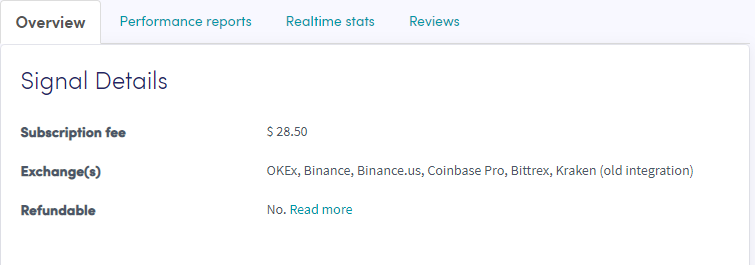
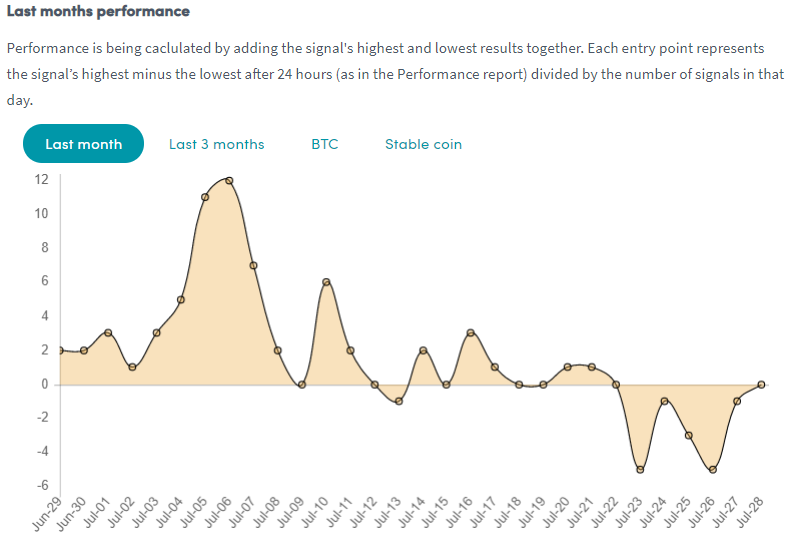
La descripción general muestra información detallada para ayudarte a decidir si un Señalizador es la opción adecuada. Verifica que los exchanges que usa el Señalizador coincidan con tu exchange — si no es así, no recibirás ninguna señal para tu exchange. Un gráfico muestra el rendimiento del Señalizador durante el último mes o 3 meses, con ganancias/pérdidas en el eje izquierdo y fechas debajo, dándote una imagen clara del rendimiento diario promedio.
Reportes de rendimiento

Muestra las monedas señalizadas más recientemente y su ganancia. Verifica que el Señalizador envíe señales para las monedas que quieres comerciar y revisa qué ganancia se obtuvo.
Estadísticas en tiempo real
Una descripción general de todos los datos de trading del último mes.
Reseñas
Lo que otros traders piensan del Señalizador.
Notas importantes
- Los Vendedores del Marketplace y Señalizadores no tienen permitido administrar completamente tu cuenta. Nunca compartas tus Claves API o contraseña de cuenta.
- La mayoría de los vendedores ofrecen soporte por correo electrónico, pero esto no es obligatorio. Al contactar a un vendedor, usa solo capturas de pantalla — nunca compartas tu contraseña de cuenta.
- Si no estás seguro del nivel de soporte de un Señalizador, contáctalos antes de comprar. Los datos de contacto están disponibles en la página del Marketplace de cada Señalizador.
- Si estás satisfecho con un Señalizador, ¡deja una reseña!