What is the Signaler’s page
An explanation of what you can find on a Signaler's Marketplace page.
Signaler's page
Overview
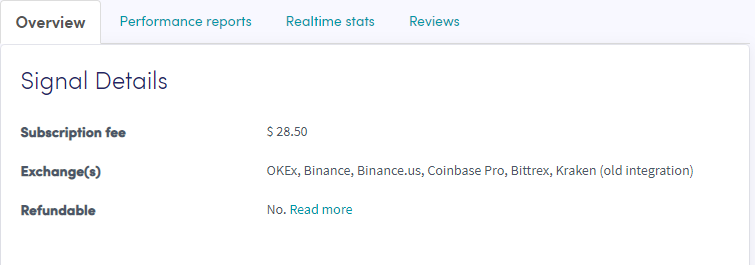
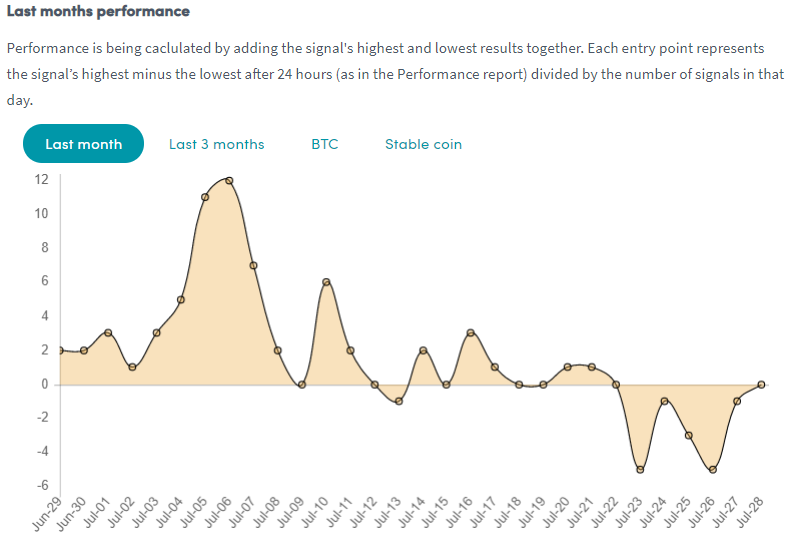
The overview shows detailed information to help you decide if a Signaler is the right fit. Check that the exchanges the Signaler uses match your exchange — if not, you won't receive any signals for your exchange. A graph shows the Signaler's performance over the past month or 3 months, with profit/loss on the left axis and dates below, giving you a clear picture of average daily performance.
Performance reports

Shows the most recently signaled currencies and their profit. Check that the Signaler sends signals for the currencies you want to trade and review what profit was made.
Realtime stats
An overview of all trade data from the last month.
Reviews
What other traders think of the Signaler.
Important notes
- Marketplace Sellers and Signalers are not permitted to fully manage your account. Never share your API Keys or account password.
- Most sellers offer support via email, but this is not required. When contacting a seller, use screenshots only — never share your account password.
- If you are unsure of a Signaler's support level, contact them before purchasing. Contact details are available on each Signaler's Marketplace page.
- If you're happy with a Signaler, leave a review!