¿Cuáles son los diferentes ajustes para agregar un Paquete como Vendedor del Marketplace?
Una explicación de cada ajuste al agregar un Paquete al Marketplace.
Ajustes de detalles
Nombre Ingresa un nombre para tu Paquete.
Descripción Describe tu producto, incluye el rendimiento esperado, ajustes recomendados y tus datos de contacto.
Precio en USD ($) Establece el precio para tu Paquete. Los Paquetes se pueden ofrecer de forma gratuita. Haz clic en "Ver todos los precios y ganancias" para ver tus ganancias en cada nivel de precio. El precio se puede cambiar en cualquier momento.
Logo Sube la imagen frontal que se muestra en el Marketplace. Tamaño requerido: 600px × 430px. Haz clic en "Cambiar Logo" o haz clic en la imagen y selecciona "Subir Logo" para actualizarla.
Promoción Sube una imagen de banner que se muestra en la parte superior de la página de descripción de tu producto. Tamaño requerido: 1200px × 450px. Haz clic en "Cambiar Promoción" o haz clic en la imagen y selecciona "Subir Logo" para actualizarla.
Redes sociales Completa tus datos de Twitter, Facebook y Telegram. También es buena idea incluirlos en la descripción de tu producto.
Pestaña de ajustes
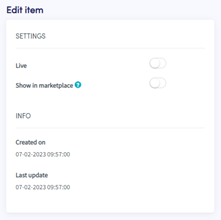
Activo Activa el interruptor y haz clic en "Guardar" para publicar tu Paquete en el Marketplace y hacerlo visible para los clientes.
Mostrar en Marketplace Cuando está deshabilitado, solo las personas con el enlace directo al Paquete pueden comprarlo. Útil para enviar descuentos exclusivos a clientes específicos.