What are the different settings for adding a Package deal as a Marketplace Seller
An explanation of every setting when adding a Package Deal to the Marketplace.
Details settings
Name Fill in a name for your Package Deal.
Description Describe your product, include expected performance, recommended settings, and your contact details.
Price in USD ($) Set the price for your Package Deal. Package Deals can be offered for free. Click "View all prices and proceeds" to see your earnings at each price level. The price can be changed at any time.
Logo Upload the front image shown in the Marketplace. Required size: 600px × 430px. Click "Change Logo" or click the image and select "Upload Logo" to update it.
Promo Upload a banner image displayed at the top of your product's description page. Required size: 1200px × 450px. Click "Change Promo" or click the image and select "Upload Logo" to update it.
Social media Fill in your Twitter, Facebook, and Telegram details. It's also a good idea to include these in your product description.
Settings tab
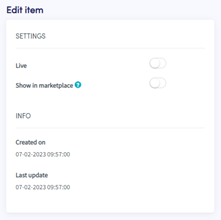
Live Switch the toggle and click "Save" to publish your Package Deal on the Marketplace and make it visible to customers.
Show in Marketplace When disabled, only people with the direct link to the Package Deal can purchase it. Useful for sending exclusive discounts to specific customers.