¿Cuáles son los diferentes ajustes para agregar una Estrategia o Plantilla como Vendedor del Marketplace?
Una explicación de cada ajuste al agregar una Estrategia o Plantilla al Marketplace.
Ajustes de detalles
Nombre El nombre de tu Estrategia o Plantilla. Por defecto es el nombre con el que la guardaste — cámbialo aquí si es necesario.
Descripción Describe tu producto, incluye el rendimiento esperado, ajustes recomendados y tus datos de contacto. Cuanto más detalle, mejor.
Precio en USD ($) Establece el precio de tu producto. Haz clic en "Ver todos los precios y ganancias" para ver cuánto ganas en cada nivel de precio después de deducir la comisión de Cryptohopper.
Logo Sube la imagen frontal que se muestra en el Marketplace. Tamaño requerido: 600px × 430px. Por defecto, se usa el logo del Constructor de Estrategias. Para cambiarlo, haz clic en "Cambiar Logo" o haz clic directamente en la imagen y selecciona "Subir Logo".
Promo Sube una imagen de banner que se muestra en la parte superior de la página de descripción de tu producto. Tamaño requerido: 1200px × 450px. Para cambiarla, haz clic en "Cambiar Promo" o haz clic en la imagen y selecciona "Subir Logo".
Redes sociales Completa tus datos de Twitter, Facebook y Telegram. También es buena idea incluirlos en la descripción de tu producto.
Pestaña de ajustes
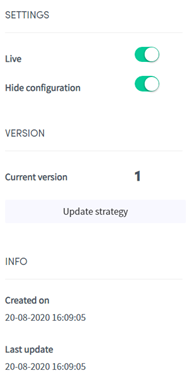
En vivo Activa el interruptor y haz clic en "Guardar" para publicar tu Estrategia o Plantilla en el Marketplace y hacerla visible para los usuarios.
Mostrar en Marketplace Cuando está desactivado, tu producto está oculto del listado del Marketplace. Útil para probar un producto o restringir el acceso a usuarios que tienen el enlace directo.
Ocultar configuración Cuando está activado, los usuarios que descargan la Estrategia no pueden ver los Indicadores Técnicos, Patrones de Velas, marcos de tiempo o Señales requeridas — solo el nombre y la descripción son visibles.
Actualizar Estrategia Usa esto para enviar una actualización a tu Estrategia o Plantilla. Siempre incluye información clara sobre lo que cambió en cada actualización.
Info Muestra cuándo se creó la Estrategia o Plantilla por primera vez y cuándo se actualizó por última vez.
Comisiones y Exclusividad Cryptohopper toma una comisión del 30% en cada venta. Haz clic en "Ver todos los precios y ganancias" para ver tus ingresos exactos en cada punto de precio. Puedes reducir la comisión al 15% y obtener beneficios adicionales al unirte al Programa de Exclusividad. Para más información, envía un email a [email protected].