Cómo usar el Backtester
El Backtester de Cryptohopper te permite probar retroactivamente todos los ajustes de tu plantilla y bot — excepto los Disparadores, las estrategias integradas (mostradas en la lista de Estrategias en tu Configuración) y las Alertas de TradingView. El Backtester está disponible actualmente exclusivamente para Vendedores del Marketplace.
Prerrequisitos
- Una cuenta de Cryptohopper.
- Una plantilla creada o un Bot de Trading.
- Una suscripción de Cryptohopper.
Pasos
- Ve a la vista general de tu bot, selecciona un bot y haz clic en "Backtesting" y luego en "Ir al nuevo backtesting".
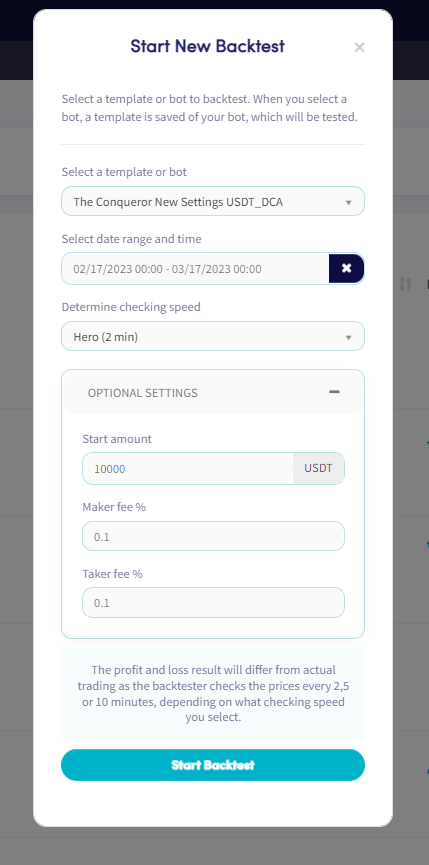
- Haz clic en "Nuevo backtest".
- Selecciona la Plantilla o Bot que deseas probar retroactivamente.
- Elige un rango de fechas y período de tiempo. Nota: el período de tiempo máximo permitido es de un mes.
- Configura la velocidad de verificación para tu backtest.
- Configura tu cantidad inicial y el porcentaje de tarifa Maker/Taker. (Opcional)
- Haz clic en "Iniciar Backtest".
Durante el backtest, puedes rastrear su progreso en la vista general del backtest — incluyendo qué tan cerca está de completarse y qué operaciones han sido identificadas. Al hacer clic en un backtest se muestran los siguientes detalles:
- Nombre de la plantilla o bot
- Exchange
- Moneda de cotización
- Mercados
- Período del backtest
- Nivel de suscripción
- Cuándo se creó el backtest y cuándo se procesó la última verificación
- Descripción
- Ganancia durante el período probado retroactivamente
- Ventas exitosas
- Ventas con pérdida
- Estatus
consejo
Para más información sobre las pestañas del Backtester, consulta Qué es el Backtester.