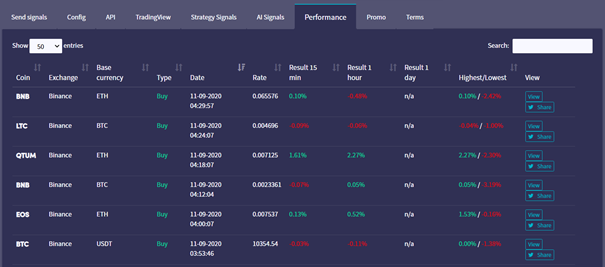
Wie du deine Signalgeber-Performance-Seite als Signalgeber liest
Diese Anleitung zeigt dir, wie du deine Signalgeber-Performance-Seite liest.
Voraussetzungen
- Ein Cryptohopper-Konto.
- Genehmigter Status als Signalgeber.
- Aktive Signale, die gesendet werden.
Schritte
- Melde dich an bei deinem Cryptohopper-Konto.
- Klicke auf "Marketplace".
- Klicke auf "Signalgeber Dashboard".
- Klicke auf "Performance" und überprüfe deine Ergebnisse.