How to use the Backtester
Cryptohopper's Backtester lets you backtest all of your template and bot settings — except for Triggers, built-in strategies (shown in the Strategy list in your Configuration), and TradingView Alerts. The Backtester is currently available exclusively to Marketplace Sellers.
Prerequisites
- A Cryptohopper account.
- A created template or Trading Bot.
- A Cryptohopper subscription.
Steps
- Go to your bot overview, select a bot, and click "Backtesting" than "Go to new backtesting".
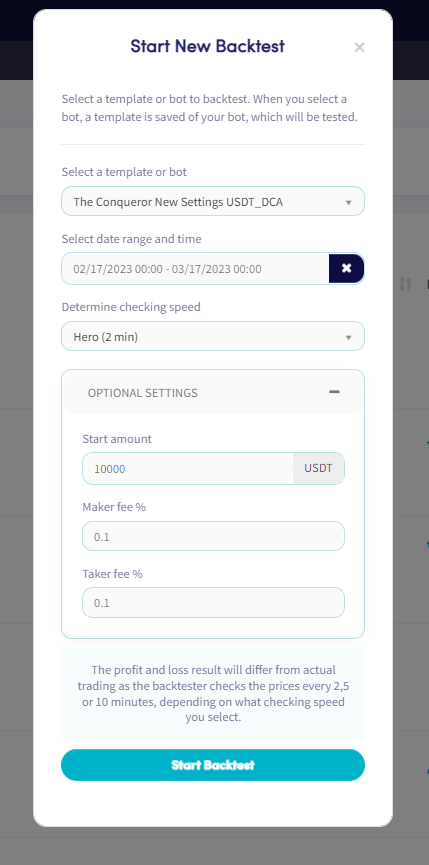
- Click "New backtest".
- Select the Template or Bot you want to backtest.
- Choose a date range and time period. Note: the maximum time period allowed is one month.
- Set the checking speed for your backtest.
- Set your start amount and Maker/Taker fee percentage. (Optional)
- Click "Start Backtest".
During the backtest, you can track its progress in the backtest overview — including how close it is to completion and which trades have been identified. Clicking on a backtest shows the following details:
- Template or bot name
- Exchange
- Quote currency
- Markets
- Backtest period
- Subscription level
- When the backtest was created and when the last check was processed
- Description
- Profit over the backtested period
- Successful sells
- Loss sells
- Status
팁
For more information about the Backtester tabs, see What is the Backtester.