Comment utiliser le Backtesteur
Le Backtesteur de Cryptohopper te permet de backtester tous tes paramètres de modèle et de bot — sauf les Triggers, les stratégies intégrées (affichées dans la liste Stratégie de ta Configuration) et les Alertes TradingView. Le Backtesteur est actuellement disponible exclusivement pour les Vendeurs du Marketplace.
Conditions
- Un compte Cryptohopper.
- Un modèle ou Trading Bot créé.
- Un abonnement Cryptohopper.
Étapes
- Va dans ton aperçu des bots, sélectionne un bot et clique sur "Backtesting" puis "Go to new backtesting".
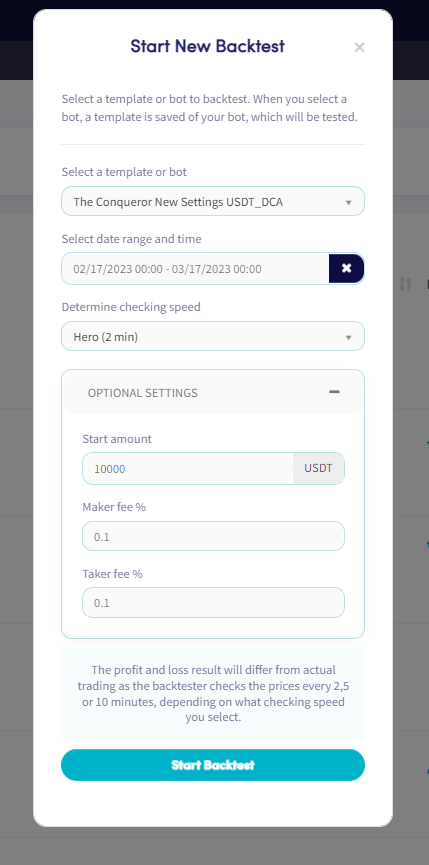
- Clique sur "New backtest".
- Sélectionne le Modèle ou Bot que tu veux backtester.
- Choisis une plage de dates et une période. Remarque : la période maximale autorisée est d'un mois.
- Définis la vitesse de vérification pour ton backtest.
- Définis ton montant de départ et ton pourcentage de frais Maker/Taker. (Optionnel)
- Clique sur "Start Backtest".
Pendant le backtest, tu peux suivre sa progression dans l'aperçu du backtest — y compris sa proximité de l'achèvement et les transactions qui ont été identifiées. Cliquer sur un backtest affiche les détails suivants :
- Nom du modèle ou du bot
- Exchange
- Devise de cotation
- Marchés
- Période de backtest
- Niveau d'abonnement
- Quand le backtest a été créé et quand la dernière vérification a été traitée
- Description
- Profit sur la période backtestée
- Ventes réussies
- Ventes en perte
- Statut
astuce
Pour plus d'informations sur les onglets du Backtesteur, consulte Qu'est-ce que le Backtesteur.