Lewati ke konten utama

How to use your Cryptohopper profile

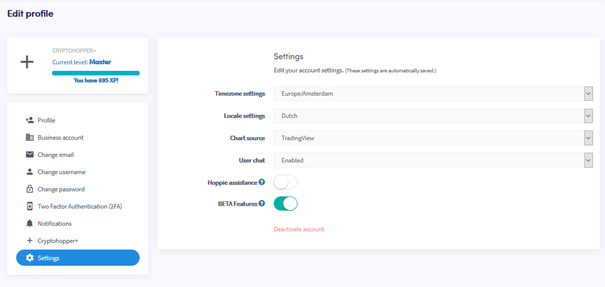
This tutorial shows you how to change your settings.

Prerequisites

Before you begin, check the following:

How to change your settings

  1. Log in to your Cryptohopper account.
  2. Click the profile button in the upper right corner.
  3. Click “My account”.
  4. Click “User Profile”.
  5. Click “Settings”.
  6. Change the settings you want to change.

settings

Apakah artikel ini membantu?

Konten

Butuh bantuan?

Tidak dapat menemukan jawaban untuk pertanyaan kamu?Cek F.A.Q.Hubungi dukungan

Mulai trading dengan Cryptohopper secara gratis!

Gratis digunakan – tidak memerlukan kartu kredit

Let's get started
Aplikasi baru segera hadir!