What are the trade settings of the Bulk Bot Manager
An explanation of every trade setting in the Bulk Bot Manager. All actions in the Trade tab are executed based on the Baseconfig settings configured in each individual bot. For example, if one bot uses limit orders and another uses market orders, each will follow its own settings — unless you override this by enabling the "Market order" checkbox.
Before using trade settings, make sure you have selected one or more bots. For more information about the bots overview, see What to find on the bots overview in the Bulk Bot Manager.
Buy
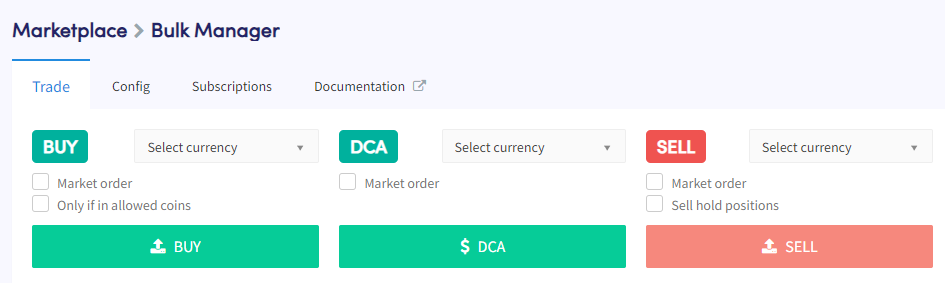
Place buy orders for a specific currency across multiple bots at once.
Select currency Choose the currency to buy. Orders will be placed based on your Baseconfig buy amount settings, provided the currency is available for the quote currencies used in your selected bots. Always confirm currency availability on your selected exchanges before buying.
Market order By default, the bot uses the order type from your Baseconfig buy settings. Enable this checkbox to force all orders across all bots to use market orders.
Only if in allowed coins By default, buy orders are placed in all selected bots. Enable this checkbox to skip bots where the currency is not in the allowed coins list. Note: if the currency wasn't selected when placing the order, positions will follow your Baseconfig sell settings.
Buy Click "Buy" to place buy orders in your selected bots. Manual buys always override the Baseconfig limits for maximum open positions and maximum open positions per currency.
DCA
Place Dollar-Cost Averaging orders for a specific currency across multiple bots.
Select currency Choose the currency to DCA. Orders will be placed based on your Baseconfig DCA settings, provided the currency is available and you already have an open position.
Market order By default, the bot uses the order type from your Baseconfig buy settings. Enable this checkbox to force all DCA orders to use market orders.
DCA Click "DCA" to place DCA orders in your selected bots.
Sell
Place sell orders for a specific currency across multiple bots.
Select currency Choose the currency to sell.
Market order By default, bots use the order type from your Baseconfig sell settings. Enable this checkbox to force all sell orders to use market orders.
Sell hold positions By default, held positions are not sold. Enable this checkbox to include held positions in the sell action.
Sell Click "Sell" to place sell orders in your selected bots.
Bot settings

Change settings that apply to the overall buying and selling functionality of your selected bots.
Cancel orders Cancels all open buy and sell orders across your selected bots.
Panic mode Sells all open positions, removes short positions, and stops the selected bots. Selling may take some time — perform a hard refresh of the page to get the most up-to-date status. You will need to re-enable your bots to continue trading.
Sync positions Syncs positions that are on your exchange but not yet visible on your Cryptohopper Dashboard.
Enable bots Allows the bots to retrieve information from your exchange accounts. When enabled, open positions, open orders, and total assets will update.
Enable buying Enables your bots to open positions automatically based on your Baseconfig settings.
Enable selling Enables your bots to close positions automatically based on your Baseconfig settings.
Disable bots Prevents the bots from retrieving information from your exchange accounts. Open positions, open orders, and total assets will stop updating.
Disable buying Prevents your bots from opening positions automatically.
Disable selling Prevents your bots from closing positions automatically.