How to withdraw your earnings as a Marketplace Seller
This guide shows you how to withdraw your earnings as a Marketplace Seller.
Prerequisites
- A Cryptohopper account.
- Approved status as a Signaler or Marketplace Seller.
- Earned $75 or more from Marketplace sales.
Steps
- Log in to your Cryptohopper account.
- Click the profile button in the top-right corner.
- Click "Subscriptions".
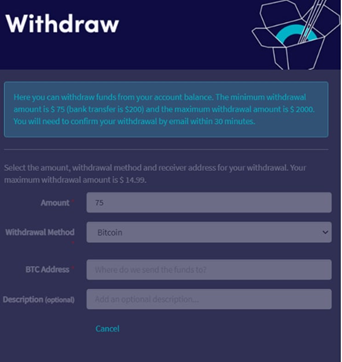
- Click "Withdraw".
- Fill in all the required fields.
Additional information
Revenue appears on your balance after 6 weeks. Funds become available for withdrawal the following Monday, with the actual payout processed on Tuesdays.
情報
The minimum withdrawal amount is $75.