Cosa c'è sulla dashboard per il bot di Arbitraggio di mercato
Questa guida spiega cosa puoi trovare sulla Dashboard di Arbitraggio di mercato.
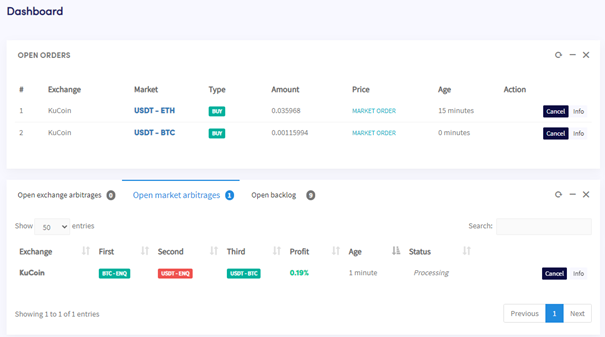
Sezioni della dashboard
Ordini aperti Tutti gli ordini attivi attualmente utilizzati dal bot. Se il bot è nel mezzo di un'operazione di arbitraggio, apparirà anche qui.
Arbitraggi di mercato aperti e backlog
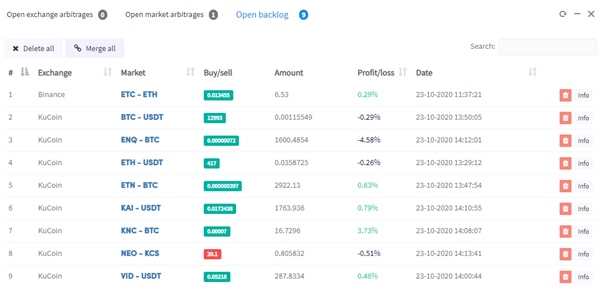
Tutti gli Arbitraggi di mercato attualmente aperti e il backlog.
Ultimi Arbitraggi di mercato Un registro dei trades recenti e se hanno avuto successo.
Hopper abilitato / disabilitato Abilita o disabilita l'Arbitraggio di mercato.
Risultati Arbitraggio di mercato
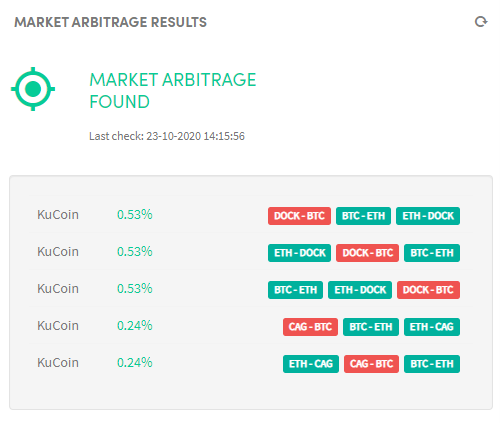
Il tuo bot scansiona i mercati alla ricerca di opportunità di arbitraggio e mostra i risultati qui. Usa questo per verificare se le tue impostazioni sono troppo rigide e se il tuo bot è configurato correttamente.
Ordine manuale Piazza un ordine manuale se non hai fondi sufficienti per una particolare valuta, assicurandoti che il tuo saldo sia sufficiente in tutti i mercati selezionati.
Totali Mostra cosa c'è sul tuo exchange e se hai realizzato un profitto. Ripristina i saldi quando inizi per un monitoraggio accurato dei profitti.
Asset Mostra cosa c'è su ogni exchange. Seleziona un exchange per visualizzare il suo saldo.
Output Dove il bot comunica con te. Segnala eventuali errori o problemi riscontrati.