What is on the dashboard for the Market Arbitrage bot
This guide explains what you can find on the Market Arbitrage Dashboard.
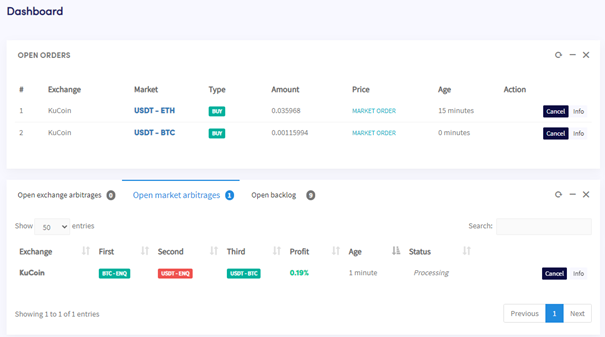
Dashboard sections
Open orders All active orders currently being used by the bot. If the bot is in the middle of an arbitrage trade, it will appear here too.
Open Market Arbitrages and backlog
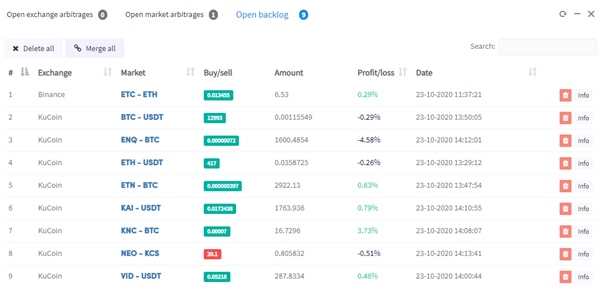
All current open Market Arbitrages and the backlog.
Latest Market Arbitrages A record of recent trades and whether they were successful.
Hopper enabled / disabled Enable or disable Market Arbitrage.
Market Arbitrage results
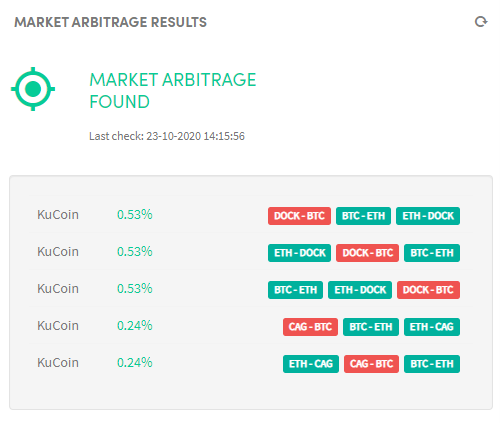
Your bot scans markets for arbitrage opportunities and displays the results here. Use this to check whether your settings are too tight and whether your bot is correctly configured.
Manual order Place a manual order if you don't have enough funds for a particular currency, ensuring your balance is sufficient across all selected markets.
Totals Shows what's on your exchange and whether you've made a profit. Reset the balances when you start for accurate profit tracking.
Assets Shows what's on each exchange. Select an exchange to view its balance.
Output Where the bot communicates with you. It reports any errors or problems it encounters.